Amazon EKS Explained for .NET Developers
Summary
Managed Kubernetes on AWS for .NET engineers — how EKS, ECR, IRSA, load balancers, and Secrets Manager map to the Kubernetes concepts you already know.
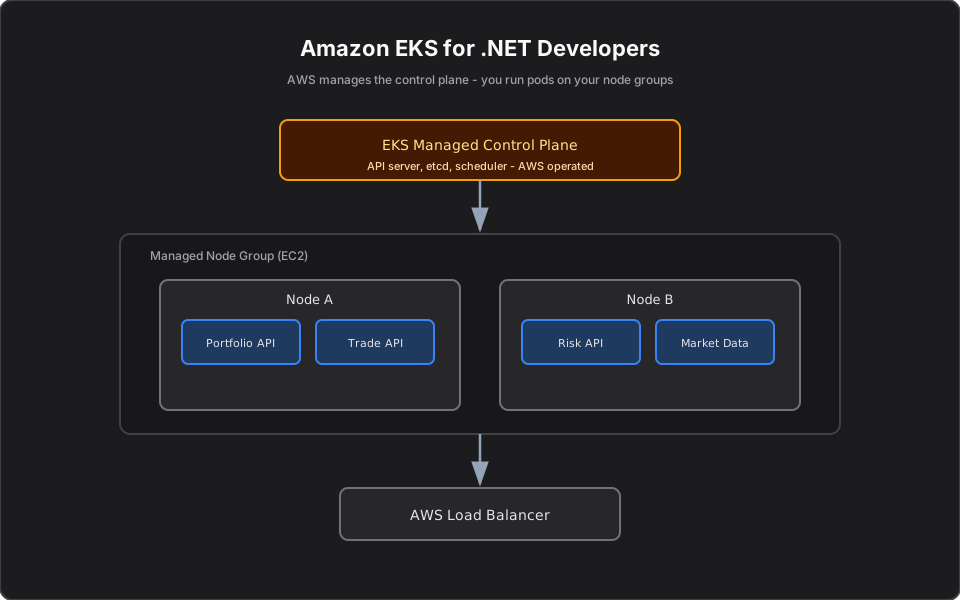
Short answer: Amazon EKS is managed Kubernetes on AWS. AWS runs the control plane (API server, etcd, scheduler) for you; you run your .NET Pods on worker Nodes (EC2 or Fargate). You push images to ECR, expose Services via AWS load balancers, pull secrets from Secrets Manager, and ship logs to CloudWatch. It is Kubernetes with the hardest operational parts handled by AWS.
Part 11 of the series. Previous: Helm Charts Explained for Developers.
Introduction
If your company is on AWS and wants Kubernetes, EKS is usually the answer. This article maps the Kubernetes concepts you have learned onto concrete AWS services, from a .NET developer's point of view.
The problem
Running Kubernetes yourself means operating etcd, patching the control plane, handling high availability, and securing the API server — undifferentiated heavy lifting that has nothing to do with your trading platform. You want to deploy .NET services, not babysit a control plane.
Simple explanation
EKS splits responsibility cleanly. AWS owns and operates the brain of the cluster across multiple availability zones. You own the workers and the workloads. You still use normal Kubernetes objects (Deployments, Services, Ingress) and normal tools (kubectl, Helm) — EKS just removes the operational burden of the control plane.
Official Kubernetes concept
EKS-specific pieces layered on standard Kubernetes:
- Managed control plane: AWS-run API server, etcd, scheduler.
- Node groups / Fargate: EC2 worker Nodes you manage, or serverless Fargate Pods.
- IRSA (IAM Roles for Service Accounts): gives Pods scoped AWS permissions without static keys.
- AWS Load Balancer Controller: turns Services/Ingress into ALBs/NLBs.
- EBS/EFS CSI drivers: back PersistentVolumes with AWS storage.
How it works
You create an EKS cluster (control plane) and attach a node group. You push your .NET image to ECR, then `helm upgrade` or `kubectl apply` your manifests. The Scheduler places Pods on Nodes; the AWS Load Balancer Controller provisions an ALB for your Ingress; IRSA lets the Pod call AWS APIs (S3, Secrets Manager) with a scoped role. To your application code, it is just Kubernetes — the AWS integration is configuration, not code.
Finance example
Your trading platform runs Portfolio, Trade, Market Data, and Risk APIs as Deployments on an EKS node group spread across three availability zones. Secrets (database passwords, broker API keys) come from Secrets Manager via IRSA — no credentials in YAML. At market open, the Cluster Autoscaler/Karpenter adds EC2 Nodes so extra Risk Pods have somewhere to run; afterward it scales back down to control cost.
C# example
Your service reads config and uses the AWS SDK with the Pod's IRSA role — no embedded keys:
// IRSA injects temporary AWS credentials into the Pod automatically.
var secrets = new AmazonSecretsManagerClient();
var dbConn = (await secrets.GetSecretValueAsync(
    new GetSecretValueRequest { SecretId = "prod/portfolio/db" })).SecretString;

app.MapGet("/positions/{accountId}", async (string accountId, IPortfolioService svc) =>
    await svc.GetPositions(accountId));
AWS example
The full mapping you will use daily:
| Kubernetes need | AWS implementation |
|---|---|
| Image registry | Amazon ECR |
| Managed control plane | Amazon EKS |
| Worker compute | EC2 node groups or Fargate |
| External Service/Ingress | ALB/NLB via AWS Load Balancer Controller |
| Pod AWS permissions | IRSA |
| Secrets | AWS Secrets Manager |
| Persistent storage | EBS / EFS CSI |
| Logs and metrics | CloudWatch / Container Insights |
Architecture diagram
Production reality
Running EKS well is mostly AWS-integration discipline:
- IRSA is the single biggest security win — and the most common thing done wrong. Teams fall back to Node instance-profile permissions (every Pod inherits the Node's role) instead of per-workload roles. Scope IAM to the service account.
- Cluster upgrades are your job and they are non-trivial. EKS supports a limited set of Kubernetes versions; you must upgrade the control plane and node groups on AWS's cadence or lose support. Plan it as recurring work.
- Karpenter usually beats Cluster Autoscaler for cost. It provisions right-sized (and Spot) Nodes on demand, which matters when Risk-engine load is spiky around market hours.
- Cost traps: cross-AZ data transfer between Pods, idle node groups, and one-load-balancer-per-service add up fast. Consolidate LBs and keep chatty services co-located.
- Observability: wire Container Insights and structured logs early; debugging a multi-AZ .NET service without them is painful.
AI Engineering connection
EKS is where AI platforms land on AWS: GPU node groups for self-hosted models, IRSA to let an agent call Bedrock or S3 without static keys, and Karpenter to spin up expensive GPU Nodes only when a model-serving workload needs them. The .NET deployment story here is identical for an MCP server or AI agent.
Interview questions
- What does EKS manage vs what do you manage? AWS manages the control plane; you manage worker Nodes and workloads.
- What is IRSA and why use it? IAM Roles for Service Accounts give Pods scoped AWS permissions with temporary credentials, avoiding static keys.
- EC2 node groups vs Fargate on EKS? Node groups give you control and cost efficiency at scale; Fargate runs Pods serverlessly with no Node management.
- How does a Service get a public endpoint on EKS? The AWS Load Balancer Controller provisions an ALB/NLB for LoadBalancer Services or Ingress.
- How do Pods scale capacity on EKS? HPA scales Pods; Cluster Autoscaler or Karpenter adds/removes Nodes.
Key takeaways
- EKS = managed control plane; you own Nodes and workloads.
- Standard Kubernetes objects and tools still apply — AWS integration is configuration.
- Use IRSA for credentials, ECR for images, ALB/Ingress for traffic.
- Combine HPA with Cluster Autoscaler/Karpenter for elastic, cost-aware scaling.
Next article
Next: ECS vs EKS — when you do not actually need Kubernetes. Previous: Helm Charts Explained for Developers.
Frequently asked questions
- What does Amazon EKS manage versus what do I manage?
- AWS manages the Kubernetes control plane (API server, etcd, scheduler). You manage worker Nodes (EC2 or Fargate) and your workloads.
- What is IRSA and why use it?
- IAM Roles for Service Accounts give Pods scoped AWS permissions using temporary credentials, so you never embed static access keys.
- How does a Service get a public endpoint on EKS?
- The AWS Load Balancer Controller provisions an ALB or NLB for LoadBalancer Services or Ingress resources.
Related reading
ECS vs EKS: Which AWS Container Service Should You Use?
A clear decision framework for ECS vs EKS — simplicity versus the Kubernetes ecosystem — so you pick the right AWS container service instead of defaulting to one.
Helm Charts Explained for Developers
The anatomy of a Helm chart — Chart.yaml, values.yaml, and templates — with a practical .NET service example you can actually ship to EKS.
Kubernetes Networking Explained for Developers
How traffic reaches your Pods: Services, ClusterIP, Ingress, and cluster DNS explained without the iptables deep-dive. With finance, C#, and AWS examples.