Helm Charts Explained for Developers
Summary
The anatomy of a Helm chart — Chart.yaml, values.yaml, and templates — with a practical .NET service example you can actually ship to EKS.
Short answer: A Helm chart is a folder with a predictable layout: `Chart.yaml` (metadata), `values.yaml` (default config), and a `templates/` directory of manifests using placeholders. You render it with your values to produce real Kubernetes objects. Knowing these few files is enough to package any .NET service.
Part 10 of the series. Previous: What Is Helm and Why Kubernetes Needed a Package Manager?.
Introduction
The previous article covered why Helm exists. This one is the practical anatomy: what is in a chart, how templating works, and how to ship a finance service with it — without drowning in templating syntax.
The problem
You understand Helm conceptually but a chart still looks like a black box. Where do values come from? How does a template become a Deployment? What is the minimum you need to package the Trade API cleanly for three environments?
Simple explanation
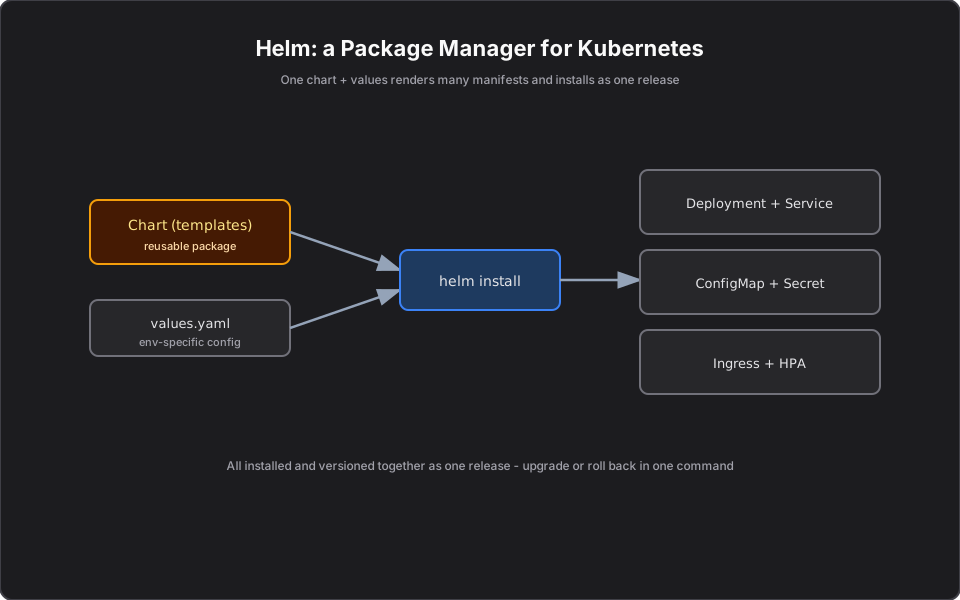
A chart is just an organized folder. One file describes the package, one file holds default settings, and a templates folder holds your manifests with blanks to fill in. Helm merges your settings into the blanks and applies the result.
Official Kubernetes concept
Standard chart layout:
- Chart.yaml — name, version, description.
- values.yaml — default configuration values.
- templates/ — manifest templates (Deployment, Service, Ingress, HPA, ConfigMap).
- templates/_helpers.tpl — reusable naming/label snippets.
Helm uses Go templating: `{{ .Values.x }}` injects a value, `{{ include ... }}` reuses helpers, and conditionals/loops let one template serve many cases.
How it works
`helm install trade-api ./trade-api -f values-prod.yaml` does three things: loads defaults from `values.yaml`, overlays `values-prod.yaml`, renders every file in `templates/` with the merged values, and applies the rendered manifests as one release. `helm template` renders locally so you can review the exact YAML before shipping — a good habit in regulated environments where every change is reviewed.
Finance example
A minimal Trade API chart exposes the knobs that differ by environment: image tag, replicas, and the market-data URL. Promotion is just a different values file. Auditors can diff `values-prod.yaml` to see exactly what prod runs, and `helm history trade-api` shows every release for change tracking.
C# example
A templated Deployment for an ASP.NET service:
# templates/deployment.yaml
apiVersion: apps/v1
kind: Deployment
metadata:
  name: {{ .Release.Name }}
spec:
  replicas: {{ .Values.replicaCount }}
  selector:
    matchLabels: { app: {{ .Release.Name }} }
  template:
    metadata:
      labels: { app: {{ .Release.Name }} }
    spec:
      containers:
        - name: app
          image: "{{ .Values.image.repository }}:{{ .Values.image.tag }}"
          ports: [{ containerPort: 8080 }]
# values-prod.yaml
replicaCount: 6
image:
repository: <account>.dkr.ecr.us-east-1.amazonaws.com/trade-api
tag: "1.4.0"AWS example
In a CI/CD pipeline targeting EKS, the deploy step is usually `aws eks update-kubeconfig` followed by `helm upgrade --install trade-api ./trade-api -f values-prod.yaml`. Image tags point at ECR. You can store charts themselves in an ECR OCI repository and `helm pull` them, keeping artifacts in one registry.
Architecture diagram
Production reality
Charts that survive real teams share a few habits:
- `helm template | kubectl diff` before every prod upgrade. Seeing the exact change beats trusting the chart. In finance, that rendered diff is often the artifact attached to the change ticket.
- Use `--atomic` in CI. A failed `helm upgrade` without it can leave a half-applied release; `--atomic` auto-rolls-back on failure so you never ship a partial Trade API.
- Keep secrets out of `values.yaml`. Reference Secrets Manager (via External Secrets or CSI driver) instead of committing credentials into a values file that lands in Git.
- Library/umbrella charts cut duplication across many similar services, but over-abstraction makes debugging miserable. Favor a small, shared base over a deeply parameterized monster.
- Cost/operational: template your HPA and resource requests so each environment right-sizes itself rather than copying prod's footprint into dev.
AI Engineering connection
Packaging an MCP server as a chart lets you ship it to dev, staging, and prod with different model endpoints, replica counts, and tool credentials from one template. The `values-prod.yaml` pattern shown here is exactly how you would promote a portfolio MCP server across environments safely.
Interview questions
- What files make up a Helm chart? Chart.yaml, values.yaml, and a templates directory (often with a _helpers.tpl).
- How do values override each other? Defaults in values.yaml are overlaid by environment files and then by `--set` flags, in increasing precedence.
- How do you preview what Helm will apply? `helm template` (or `helm upgrade --dry-run`) renders manifests without applying them.
- How do you see past releases? `helm history <release>` lists revisions you can roll back to.
- Where can charts be stored? In Helm repositories or OCI registries such as Amazon ECR.
Key takeaways
- A chart is Chart.yaml + values.yaml + templates/.
- Templating injects per-environment values into shared manifests.
- Use `helm template`/`--dry-run` to review before applying.
- Charts and images both live happily in ECR for EKS deploys.
Next article
Next: Amazon EKS Explained for .NET Developers — running all of this on AWS. Previous: What Is Helm and Why Kubernetes Needed a Package Manager?.
Frequently asked questions
- What files make up a Helm chart?
- Chart.yaml (metadata), values.yaml (default config), and a templates directory of manifests, often with a _helpers.tpl for shared snippets.
- How do I preview what Helm will apply?
- Use helm template or helm upgrade --dry-run to render the final manifests without applying them — useful for review in regulated environments.
- Where can Helm charts be stored?
- In Helm repositories or OCI registries such as Amazon ECR, alongside your container images.
Related reading
What Is Helm and Why Kubernetes Needed a Package Manager?
Helm is the package manager for Kubernetes. Learn what charts, values, and releases are, and why they tame YAML sprawl across environments.
Amazon EKS Explained for .NET Developers
Managed Kubernetes on AWS for .NET engineers — how EKS, ECR, IRSA, load balancers, and Secrets Manager map to the Kubernetes concepts you already know.
Running MCP Servers on Kubernetes
An MCP server is just an HTTP service — run it on Kubernetes as a Deployment and Service with probes, autoscaling, and Secrets Manager. The MCP-specific decisions explained.