What Is Helm and Why Kubernetes Needed a Package Manager?
Summary
Helm is the package manager for Kubernetes. Learn what charts, values, and releases are, and why they tame YAML sprawl across environments.
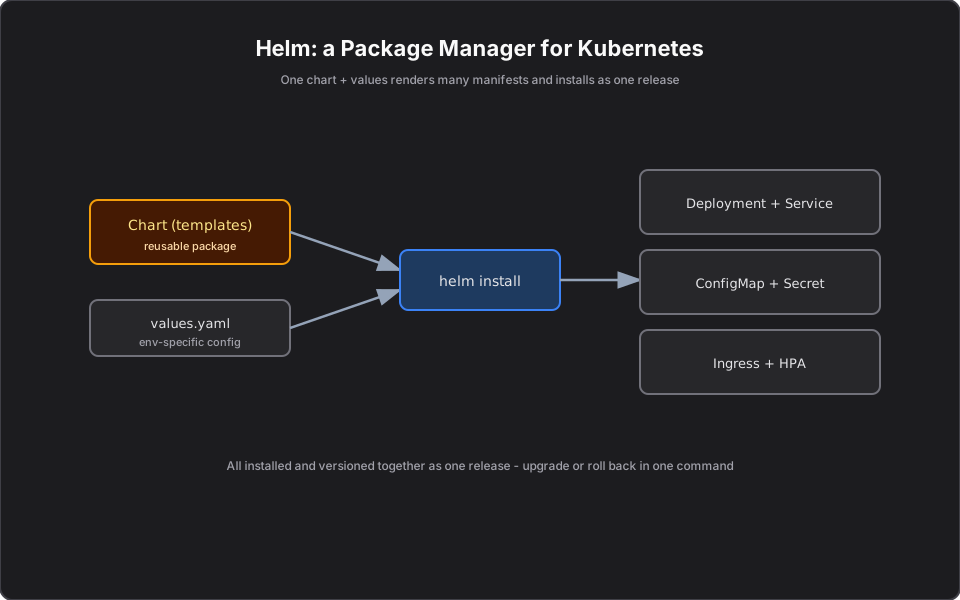
Short answer: Helm is the package manager for Kubernetes. Instead of hand-maintaining a dozen YAML files per service per environment, you bundle them into a reusable chart, supply environment-specific values, and install or upgrade everything as a single versioned release. Think NuGet or npm, but for Kubernetes manifests.
Part 9 of the series. Previous: Kubernetes Storage Explained.
Introduction
Once you run more than one service across more than one environment, raw YAML multiplies fast. Helm exists to stop that sprawl. This article explains the problem Helm solves before the next one shows you how to write a chart.
The problem
Your Portfolio API needs a Deployment, Service, ConfigMap, Secret, Ingress, and an autoscaler. Now multiply that by dev, staging, and prod — each with different replica counts, image tags, and config. You end up copy-pasting near-identical YAML and editing values by hand, which is error-prone and impossible to review cleanly. There is no single "version" of the deployment to roll back to.
Simple explanation
Helm lets you write your manifests once as templates with placeholders, then fill in the blanks per environment with a small values file. Installing is one command. Upgrading is one command. Rolling back to the previous version is one command. It turns "a pile of YAML" into "a versioned package."
Official Kubernetes concept
- Chart: a package of templated Kubernetes manifests plus metadata.
- Values: configuration inputs (`values.yaml`) that fill in the templates, overridable per environment.
- Release: a specific installed instance of a chart in a cluster, with a version history.
- Repository: a place to share charts (public or private).
How it works
A chart contains templates (Deployment, Service, and so on) with placeholders like `{{ .Values.replicaCount }}`. At install time, Helm renders the templates using your values into final manifests and applies them. Because Helm tracks each install as a versioned release, `helm upgrade` ships a new version and `helm rollback` reverts to a known-good one — atomically, across all the objects in the chart.
Finance example
You package the Portfolio API as one chart. `values-dev.yaml` sets 1 replica and a dev image; `values-prod.yaml` sets 6 replicas, the prod image tag, and prod secrets references. Promoting to prod is `helm upgrade portfolio-api ./chart -f values-prod.yaml`. If the new release misbehaves at market open, `helm rollback portfolio-api` restores the previous version — Deployment, config, and all — in seconds.
C# example
Helm does not change your code; it parameterizes how it is deployed. A template snippet wiring an env var your .NET app reads:
env:
  - name: MarketData__BaseUrl
    value: {{ .Values.marketDataUrl | quote }}
  - name: ASPNETCORE_ENVIRONMENT
    value: {{ .Values.environment | quote }}
Your app consumes it as normal configuration:
var baseUrl = builder.Configuration["MarketData:BaseUrl"];AWS example
Helm charts deploy onto EKS exactly as on any cluster. Many AWS-adjacent components (the AWS Load Balancer Controller, metrics-server, Karpenter) are themselves distributed as Helm charts you `helm install`. CI/CD (CodePipeline, GitHub Actions) typically runs `helm upgrade` against your EKS cluster to ship releases.
Architecture diagram
Production reality
Helm helps, but it has sharp edges teams learn the hard way:
- Values sprawl is the real failure mode. A chart with hundreds of toggles becomes harder to reason about than the YAML it replaced. Keep charts opinionated and expose only what genuinely varies by environment.
- `helm rollback` is not magic for data. It reverts manifests, not database migrations. A rollback after a schema change can leave your Trade store inconsistent — plan migrations to be backward-compatible.
- Pin chart and image versions. Installing third-party charts from `latest` means non-reproducible deploys. Pin versions and review upstream changes, especially for anything with cluster-wide permissions.
- Cost/operational: Helm releases store state in-cluster (Secrets). Failed upgrades can leave a release "stuck"; know `helm rollback` and `--atomic` before you need them at market open.
- Security: charts can request broad RBAC. Review what a third-party chart grants before installing — a malicious or careless chart is a cluster-wide risk.
AI Engineering connection
Most of the AI platform stack ships as Helm charts — vector databases, model servers (e.g. KServe), GPU device plugins, and observability. You will `helm install` these as building blocks, and package your own MCP servers and agents as charts so each environment is one versioned, rollback-able release.
Interview questions
- What is Helm? A package manager for Kubernetes that templates and versions groups of manifests as releases.
- What is a chart vs a release? A chart is the reusable package; a release is a specific installed instance with version history.
- How does Helm help with multiple environments? One chart plus per-environment values files, avoiding copy-pasted YAML.
- How do you roll back a bad deploy with Helm? `helm rollback` reverts the release to a previous revision across all its objects.
- Why not just use kubectl apply? It works for a few files, but lacks templating, environment values, release versioning, and one-command rollback.
Key takeaways
- Helm is package management for Kubernetes manifests.
- Write templates once; supply values per environment.
- Install, upgrade, and roll back as a single versioned release.
- On EKS, many platform add-ons ship as Helm charts too.
Next article
Next: Helm Charts Explained for Developers — anatomy of a chart you would actually ship. Previous: Kubernetes Storage Explained.
Frequently asked questions
- What is Helm in Kubernetes?
- Helm is a package manager for Kubernetes that templates and versions groups of manifests, installing them as a single release — similar to NuGet or npm for Kubernetes.
- What is the difference between a chart and a release?
- A chart is the reusable package of templates and defaults. A release is a specific installed instance of a chart in a cluster, with version history.
- How does Helm help with multiple environments?
- You use one chart plus per-environment values files, avoiding copy-pasted YAML, and can upgrade or roll back each environment in one command.
Related reading
Helm Charts Explained for Developers
The anatomy of a Helm chart — Chart.yaml, values.yaml, and templates — with a practical .NET service example you can actually ship to EKS.
Kubernetes Storage Explained: Volumes, PVs, and PVCs
Pods are disposable, so how does data survive? PersistentVolumes, PersistentVolumeClaims, StorageClasses, and StatefulSets explained, with EBS/EFS examples.
Amazon EKS Explained for .NET Developers
Managed Kubernetes on AWS for .NET engineers — how EKS, ECR, IRSA, load balancers, and Secrets Manager map to the Kubernetes concepts you already know.