How Kubernetes Keeps Applications Running
Summary
How Kubernetes self-heals: the reconciliation loop plus liveness and readiness probes keep your services alive without paging anyone. With C# and AWS examples.
Short answer: Kubernetes keeps your apps running through a reconciliation loop: you declare a desired state (for example, 3 healthy Pods), and controllers continuously compare it to reality and fix any difference. Combined with health probes that detect sick containers, this gives you self-healing without anyone getting paged.
Part 6 of the series. Previous: Kubernetes Architecture Explained Like an Airport.
Introduction
The single most valuable thing Kubernetes does for an engineer is keep services alive without manual intervention. This article explains exactly how — so you can trust it, and configure it correctly instead of fighting it.
The problem
Processes crash. Memory leaks. A dependency hangs. A Node dies. In a hand-managed world, each of these means an alert, a human, and minutes of downtime. For a Payment Processing service, minutes of downtime are real money and real compliance risk. You want the system to detect and recover from common failures automatically.
Simple explanation
Kubernetes is always asking one question: "Does what is running match what I was told to run?" If you asked for 3 Pods and only 2 are healthy, it starts a third. If a container is alive but stuck, a health check tells Kubernetes to restart it. It is a thermostat for your services — constantly nudging reality back to the setpoint.
Official Kubernetes concept
- Reconciliation loop: controllers watch desired vs actual state and act to close the gap.
- ReplicaSet: maintains the desired number of Pod replicas.
- Liveness probe: "is this container healthy?" If it fails, Kubernetes restarts the container.
- Readiness probe: "is this container ready for traffic?" If it fails, the Pod is removed from the Service until it recovers.
- Restart policy and back-off: crashed containers are restarted with increasing delay.
How it works
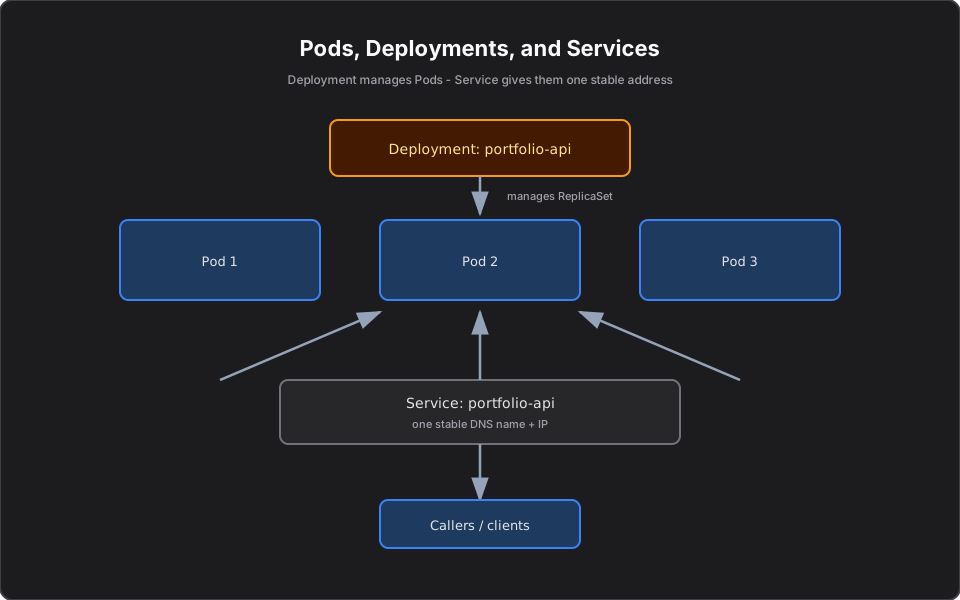
Two mechanisms work together. The ReplicaSet guarantees count — if a Pod or Node disappears, it recreates Pods elsewhere to restore the desired number. Probes guarantee quality — a running-but-broken container fails its liveness probe and gets restarted, and a not-yet-ready container is kept out of rotation by its readiness probe so users never hit it.
If restarts keep failing, you get the familiar `CrashLoopBackOff` state — Kubernetes is still trying, just with growing delays (covered later in the series).
Finance example
Your Payment Processing service must not silently accept traffic before it can reach the bank gateway. A readiness probe checks that connection; until it succeeds, the Pod stays out of the Service, so payments are never routed to a Pod that would fail them. Meanwhile, if the process deadlocks mid-day, the liveness probe fails and Kubernetes restarts that Pod automatically — while the other replicas keep processing.
C# example
Expose distinct liveness and readiness endpoints:
// Liveness: is the process itself healthy?
app.MapGet("/healthz", () => Results.Ok());

// Readiness: are downstream dependencies reachable?
app.MapGet("/readyz", (IBankGateway gw) =>
    gw.CanReach() ? Results.Ok() : Results.StatusCode(503));

public record PaymentInstruction(string AccountId, decimal Amount);
And wire them into the Pod:
livenessProbe:
  httpGet: { path: /healthz, port: 8080 }
  initialDelaySeconds: 10
readinessProbe:
  httpGet: { path: /readyz, port: 8080 }
  periodSeconds: 5
AWS example
On EKS, if an entire EC2 Node fails, the Node controller marks it NotReady and its Pods are rescheduled onto healthy Nodes. Pair this with the Cluster Autoscaler (or Karpenter) so AWS adds a new Node when there is nowhere to place the rescheduled Pods. CloudWatch alarms can watch restart counts to catch chronically unhealthy services.
Architecture diagram
Production reality
Self-healing only works if you configure it honestly:
- The most common probe mistake is pointing liveness at a deep dependency check. If `/healthz` also pings the database, a brief DB blip makes Kubernetes kill every Pod at once — turning a minor incident into an outage. Liveness should test the process; readiness tests dependencies.
- `initialDelaySeconds` too low kills slow-starting apps. A .NET service doing JIT warm-up or cache priming can fail early liveness checks and crash-loop forever. Give it room.
- Self-healing needs spare capacity. Rescheduling Pods off a dead Node only works if other Nodes have room. Without a Node autoscaler, "self-healing" quietly becomes "stuck Pending."
- Cost: running 3 replicas across 3 AZs costs more than 1 replica, but a single replica has no self-healing during its restart window. For payment flows, the redundancy is the point.
- Security: a probe endpoint should not leak internal detail (versions, dependency names) — keep it minimal.
AI Engineering connection
Long-running AI agents and MCP servers benefit enormously from this: a hung model call or a leaked connection takes down one replica, the liveness probe restarts it, and readiness keeps half-initialized agents out of rotation. The same probe discipline you use for a Payment service is what keeps an agent fleet healthy.
Interview questions
- How does Kubernetes self-heal? Controllers reconcile desired vs actual state, recreating missing Pods, while probes restart unhealthy containers.
- Difference between liveness and readiness probes? Liveness restarts a broken container; readiness keeps a not-ready Pod out of the Service without restarting it.
- What happens when a Node dies? Its Pods are marked lost and rescheduled onto healthy Nodes; an autoscaler can add capacity if needed.
- What is CrashLoopBackOff? A container that keeps crashing is restarted with an increasing back-off delay.
- Why separate readiness from liveness? So slow-starting or temporarily-degraded Pods are taken out of traffic instead of being needlessly killed.
Key takeaways
- Self-healing comes from a reconciliation loop plus health probes.
- ReplicaSets keep the right count; probes keep the running Pods healthy and ready.
- Configure readiness to gate traffic and liveness to restart hung containers.
- On EKS, combine this with an autoscaler so capacity follows demand.
Next article
Next: Kubernetes Networking Explained — how traffic actually reaches your Pods. Previous: Kubernetes Architecture Explained Like an Airport.
Frequently asked questions
- How does Kubernetes self-heal?
- Controllers continuously reconcile desired versus actual state, recreating missing Pods, while liveness probes restart unhealthy containers automatically.
- What is the difference between liveness and readiness probes?
- A liveness probe restarts a broken container. A readiness probe keeps a not-yet-ready Pod out of the Service without restarting it.
- What happens when a Node dies?
- Its Pods are marked lost and rescheduled onto healthy Nodes; a cluster autoscaler can add capacity if there is nowhere to place them.
Related reading
Kubernetes Architecture Explained Like an Airport
A memorable mental model for Kubernetes architecture: the control plane is the tower, Nodes are runways. Understand every component and how they fail.
CrashLoopBackOff Explained: How to Debug It
What CrashLoopBackOff means and a fast, repeatable routine to debug it — logs, events, exit codes, config, and probes — with C# and AWS examples.
Kubernetes Networking Explained for Developers
How traffic reaches your Pods: Services, ClusterIP, Ingress, and cluster DNS explained without the iptables deep-dive. With finance, C#, and AWS examples.