CrashLoopBackOff Explained: How to Debug It
Summary
What CrashLoopBackOff means and a fast, repeatable routine to debug it — logs, events, exit codes, config, and probes — with C# and AWS examples.
Short answer: `CrashLoopBackOff` means your container starts, exits, and Kubernetes keeps restarting it with an increasing delay. It is not a Kubernetes bug — it is Kubernetes telling you the container cannot stay running. The fix is almost always in your app or config: a missing secret, a failed dependency, a bad command, or a failing health probe.
Part 13 of the series. Previous: ECS vs EKS.
Introduction
Every Kubernetes engineer meets `CrashLoopBackOff`. The status sounds scary but it is actually a precise, helpful signal. This article turns it into a fast, repeatable debugging routine.
The problem
You deploy the Trade API and the Pod shows `CrashLoopBackOff`. Without a method, you restart it a few times, get the same result, and lose an hour. You need to know what the status means and exactly which commands reveal the cause.
Simple explanation
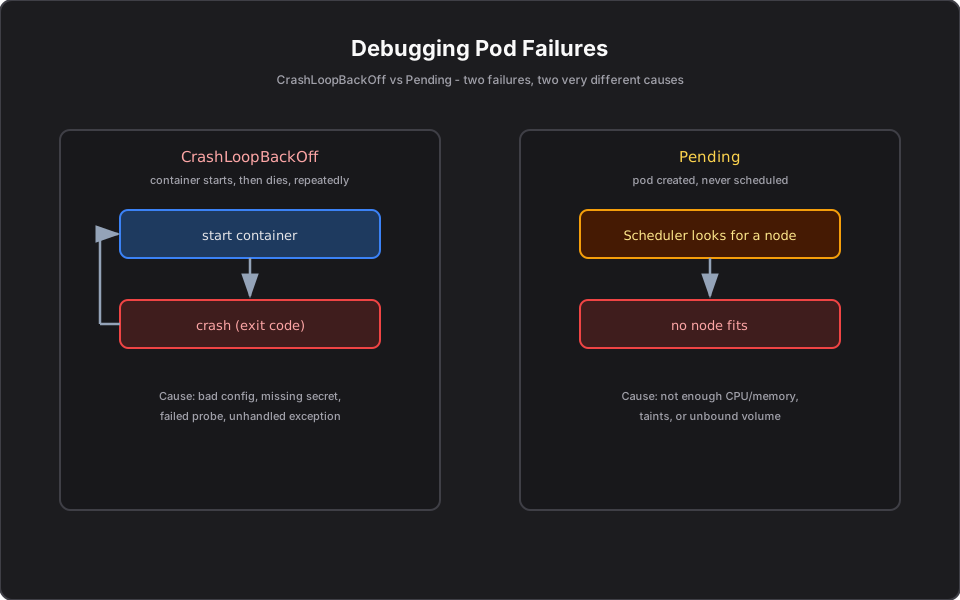
The container is stuck in a loop: start, crash, wait, start again. Each failure makes Kubernetes wait longer before the next try (the "back-off"), so the Pod is not hammered. The loop is a symptom; the real cause is whatever makes the container exit right after starting.
Official Kubernetes concept
- Restart policy + back-off: failed containers restart with exponentially increasing delay (up to a cap).
- Exit code: why the container stopped — non-zero usually means application error; 137 often means OOM-killed.
- Liveness probe: if it fails repeatedly, Kubernetes restarts the container, which can also produce the loop.
- Events: `kubectl describe pod` and `kubectl get events` show probe failures, image issues, and OOM kills.
How it works — the debugging routine
Work it in order:
1. `kubectl get pods` — confirm the status and restart count. 2. `kubectl logs <pod> --previous` — read the previous container's logs; that is where the crash reason usually is. 3. `kubectl describe pod <pod>` — check Events and the Last State exit code (137 = OOM, others = app error). 4. Check config: missing ConfigMap/Secret, wrong env var, bad connection string. 5. Check probes: a too-aggressive liveness probe can kill a healthy-but-slow-starting app.
Finance example
Your Trade API enters `CrashLoopBackOff` right after a deploy. `kubectl logs --previous` shows an unhandled exception: the broker API key env var is empty. The Secret was renamed but the Deployment still references the old key, so the container throws on startup and exits. Fixing the Secret reference resolves it. A second common case: the liveness probe path was `/health` but the app serves `/healthz`, so every probe failed and Kubernetes kept restarting a perfectly healthy service.
C# example
Two app-side habits prevent most crash loops — fail loudly on missing config, and give slow startups room:
var apiKey = builder.Configuration["Broker:ApiKey"]
    ?? throw new InvalidOperationException("Broker:ApiKey is not configured");
# Give a slow-starting .NET app time before liveness checks begin.
livenessProbe:
httpGet: { path: /healthz, port: 8080 }
initialDelaySeconds: 20
failureThreshold: 3AWS example
On EKS, `kubectl logs --previous` plus CloudWatch Container Insights give you crash history even after Pods are replaced. Exit code 137 frequently means the container exceeded its memory limit and was OOM-killed — raise the limit or fix the leak. Image pull errors (a missing ECR tag or missing pull permission) show up in Events as `ImagePullBackOff`, a close cousin.
Architecture diagram
Production reality
What CrashLoopBackOff actually looks like on a real on-call rotation:
- The cause is almost never Kubernetes. It is your config or a dependency: a renamed Secret, a bad connection string, a failed migration on startup, or an over-aggressive liveness probe. Read the previous logs first, every time.
- Exit 137 = OOM is the silent killer. A memory leak or a limit set too low gets the container reaped with no graceful error. Watch memory limits and `OOMKilled` in events, not just CPU.
- A crash loop can cascade. If the crashing service is a dependency, callers' readiness probes start failing too. Knowing the blast radius prevents chasing the wrong service.
- Cost/operational: a deploy that crash-loops on every replica during a rolling update can take a service to zero capacity if you skipped a PodDisruptionBudget and readiness gating. Gradual rollouts plus probes contain it.
- Security: crash logs often leak connection strings or tokens into log aggregators. Scrub secrets from startup error messages.
AI Engineering connection
MCP servers and agents crash-loop for very recognizable reasons: a missing model API key, an unreachable downstream tool, or an OOM from loading too large a model into a Pod with a tight memory limit. The same `logs --previous` plus exit-code routine diagnoses an agent Pod exactly as it does a Trade API.
Interview questions
- What does CrashLoopBackOff mean? The container repeatedly starts and exits, and Kubernetes restarts it with growing delays.
- First command you run to debug it? `kubectl logs <pod> --previous` to read the crashed container's logs.
- What does exit code 137 indicate? The container was killed, commonly due to exceeding its memory limit (OOM).
- How can a liveness probe cause it? A misconfigured or too-aggressive probe fails repeatedly, making Kubernetes kill and restart a healthy container.
- CrashLoopBackOff vs ImagePullBackOff? The former is a container that runs then crashes; the latter is the image failing to pull at all.
Key takeaways
- `CrashLoopBackOff` = container starts then exits repeatedly; the cause is in your app or config.
- Debug with logs --previous and describe (events + exit code).
- Common causes: missing secret/config, failed dependency, OOM (137), bad probe.
- Fail fast on missing config and tune `initialDelaySeconds` for slow starts.
Next article
Next: Why Pods Get Stuck in Pending — the other failure you will debug constantly. Previous: ECS vs EKS.
Frequently asked questions
- What does CrashLoopBackOff mean?
- The container starts, exits, and Kubernetes restarts it repeatedly with increasing delay. The root cause is usually in your app or configuration, not Kubernetes.
- What is the first command to debug CrashLoopBackOff?
- Run kubectl logs <pod> --previous to read the crashed container's logs, then kubectl describe pod for events and the exit code.
- What does exit code 137 indicate?
- The container was killed, commonly because it exceeded its memory limit (an OOM kill). Raise the limit or fix the leak.
Related reading
Why Pods Get Stuck in Pending (and How to Fix It)
A Pending Pod is a scheduling problem, not an app crash. Learn the causes — capacity, taints, unbound PVCs, affinity — and how to fix each on EKS.
How Kubernetes Keeps Applications Running
How Kubernetes self-heals: the reconciliation loop plus liveness and readiness probes keep your services alive without paging anyone. With C# and AWS examples.
ECS vs EKS: Which AWS Container Service Should You Use?
A clear decision framework for ECS vs EKS — simplicity versus the Kubernetes ecosystem — so you pick the right AWS container service instead of defaulting to one.