Why Pods Get Stuck in Pending (and How to Fix It)
Summary
A Pending Pod is a scheduling problem, not an app crash. Learn the causes — capacity, taints, unbound PVCs, affinity — and how to fix each on EKS.
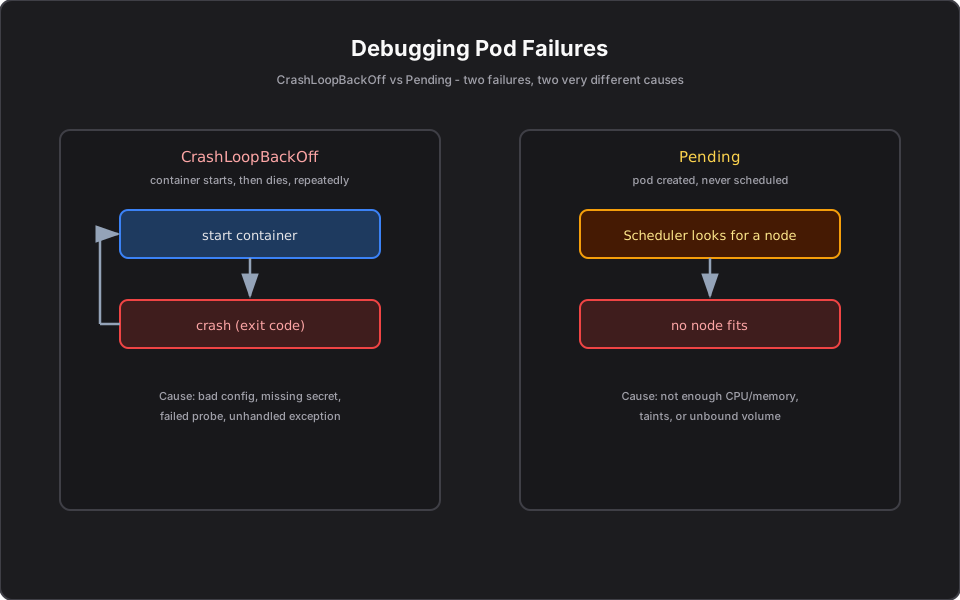
Short answer: A Pod stuck in `Pending` has been accepted by Kubernetes but the Scheduler cannot place it on any Node. The usual reasons: not enough CPU/memory anywhere, Node taints the Pod does not tolerate, an unbound PersistentVolumeClaim, or node-selector/affinity rules that match no Node. The fix is to free up or add capacity, or relax the constraint.
Part 14 of the series. Previous: CrashLoopBackOff Explained.
Introduction
`Pending` is the mirror image of CrashLoopBackOff: the container never even starts because there is nowhere to run it. It is a scheduling problem, not an application problem, so the debugging approach is completely different.
The problem
You scale the Risk API to 10 replicas before market close and three Pods sit in `Pending` indefinitely. The app is fine — there is simply no Node that can host them. You need to know why the Scheduler is refusing to place them.
Simple explanation
The Scheduler is looking for a Node that satisfies the Pod's requirements. If no Node has enough free CPU/memory, or every suitable Node is "off-limits" for this Pod, the Pod waits in `Pending`. It is a seating problem: the guest has arrived, but there is no open seat that fits their requirements.
Official Kubernetes concept
- Resource requests: the CPU/memory a Pod asks for; the Scheduler needs a Node with that much free.
- Taints and tolerations: a Node taint repels Pods unless the Pod tolerates it.
- Node affinity / nodeSelector: rules that restrict which Nodes a Pod may use.
- Unbound PVC: if a Pod needs a volume that cannot be provisioned, it stays Pending.
- Cluster Autoscaler / Karpenter: adds Nodes when Pods cannot be placed.
How it works — the debugging routine
1. `kubectl describe pod <pod>` — the Events section states the reason almost verbatim (for example, "0/6 nodes are available: insufficient cpu"). 2. If it is resources: lower the Pod's requests, free capacity, or add Nodes. 3. If it is taints: add the matching toleration or target the right node group. 4. If it is a PVC: `kubectl get pvc` — check whether it is Bound; an unbound claim blocks scheduling. 5. If it is affinity/nodeSelector: confirm a Node actually carries the required labels.
Finance example
Scaling the Risk API to 10 replicas, three Pods stay `Pending`. `kubectl describe` shows "insufficient cpu" — each Risk Pod requests 1 vCPU and the node group is full. Two fixes: enable Karpenter/Cluster Autoscaler so AWS adds an EC2 Node automatically, or right-size the requests if they were set too high. A different case: GPU-bound model-scoring Pods request `nvidia.com/gpu` but the cluster has only CPU Nodes, so they wait until a GPU node group exists.
C# example
Setting realistic resource requests is what keeps Pods schedulable. Profile the service, then declare what it actually needs:
resources:
  requests:
    cpu: "250m"      # request only what the service really uses
    memory: "256Mi"
  limits:
    cpu: "500m"
    memory: "512Mi"
Over-requesting (for example, `cpu: "2"` for a light API) is a common reason Pods cannot be placed even on a healthy cluster.
AWS example
On EKS, `Pending` due to capacity is the trigger for Cluster Autoscaler or Karpenter to launch new EC2 Nodes that fit the unschedulable Pods. If Pods need a specific instance type (GPU, high-memory), Karpenter can provision exactly that. Subnet IP exhaustion in your VPC can also block new Pods — worth checking in large clusters.
Architecture diagram
Production reality
Pending Pods are a daily operational reality at scale:
- Over-requesting resources is the number-one self-inflicted cause. A team sets `cpu: "2"` "to be safe" on a light API, and suddenly Pods will not fit on healthy Nodes. Right-size from real usage, not fear.
- Autoscaler lag is felt at market open. Even with Karpenter/Cluster Autoscaler, provisioning a new EC2 Node takes a couple of minutes. Pre-scale ahead of known spikes instead of reacting to them.
- EBS single-AZ binding causes sneaky Pending. A StatefulSet Pod whose EBS volume lives in AZ-a cannot schedule onto AZ-b Nodes. The error is about volume zone affinity, not CPU.
- VPC IP exhaustion blocks scheduling even when CPU is plentiful — common in large EKS clusters with small subnets.
- Cost angle: chronic Pending is sometimes the right signal that you are trying to run peak load on a cost-capped node group. The fix is a capacity/cost decision, not just a config tweak.
AI Engineering connection
GPU scheduling makes Pending especially common for AI workloads: a model-serving Pod requests `nvidia.com/gpu` and sits Pending until a GPU node group exists or Karpenter provisions a GPU instance. Reading "0/N nodes available: insufficient nvidia.com/gpu" is a rite of passage when running self-hosted models.
Interview questions
- What does Pending mean? The Pod is accepted but the Scheduler has not placed it on a Node yet, usually because none satisfies its requirements.
- First command to debug it? `kubectl describe pod` — the Events section states the scheduling reason.
- Common causes? Insufficient CPU/memory, taints without tolerations, unbound PVCs, or affinity/nodeSelector matching no Node.
- How does the cluster fix capacity-based Pending automatically? Cluster Autoscaler or Karpenter provisions additional Nodes.
- How do resource requests affect scheduling? The Scheduler needs a Node with enough free capacity to satisfy the Pod's requests; over-requesting causes Pending.
Key takeaways
- `Pending` is a scheduling problem — there is nowhere to place the Pod.
- `kubectl describe pod` tells you the exact reason in its Events.
- Causes: capacity, taints, unbound PVCs, affinity rules.
- Right-size requests and use an autoscaler so capacity follows demand.
Next article
Next: Kubernetes Concepts Every Staff Engineer Should Understand — the senior-level mental model. Previous: CrashLoopBackOff Explained.
Frequently asked questions
- What does it mean when a Pod is Pending?
- The Pod was accepted but the Scheduler cannot place it on any Node, usually because none has enough resources or satisfies its constraints.
- What is the first command to debug a Pending Pod?
- Run kubectl describe pod — the Events section states the scheduling reason, such as insufficient CPU or an unbound volume.
- How does a cluster fix capacity-based Pending automatically?
- Cluster Autoscaler or Karpenter provisions additional Nodes that fit the unschedulable Pods, then scales back down when demand falls.
Related reading
CrashLoopBackOff Explained: How to Debug It
What CrashLoopBackOff means and a fast, repeatable routine to debug it — logs, events, exit codes, config, and probes — with C# and AWS examples.
Kubernetes Concepts Every Staff Engineer Should Understand
Beyond YAML: the reconciliation model, resource requests, failure design, security, scaling, and cost trade-offs that staff engineers are expected to reason about.
What Happens When You Run kubectl apply?
Trace one kubectl apply command through the API server, etcd, controllers, scheduler, and kubelet — so debugging becomes a step-by-step checklist.