What Happens When You Run kubectl apply?
Summary
Trace one kubectl apply command through the API server, etcd, controllers, scheduler, and kubelet — so debugging becomes a step-by-step checklist.
Short answer: When you run `kubectl apply`, your YAML is sent to the API server, validated, and saved as desired state in etcd. Controllers notice the gap between desired and actual state and create the needed objects; the Scheduler assigns each Pod to a Node; and that Node's kubelet pulls the image and starts the container. You declared intent — the control plane made it real.
Part 4 of the series. Previous: Understanding Pods, Deployments, and Services.
Introduction
`kubectl apply -f deployment.yaml` looks like one action, but a lot happens behind it. Understanding the chain demystifies Kubernetes and makes debugging far easier — when something does not start, you will know exactly which step to inspect.
The problem
Engineers often treat `kubectl apply` as magic: type the command, hope Pods appear. When they do not, there is no mental model for where it broke. Was the YAML rejected? Did the Scheduler fail to place the Pod? Did the image pull fail on the Node? Knowing the flow turns guesswork into a checklist.
Simple explanation
Think of it like submitting a work order. You hand the order to the front desk (API server). The front desk files it in the records system (etcd). Managers (controllers) read the order and decide what needs doing. A dispatcher (Scheduler) assigns the job to a specific worker. The worker (kubelet) actually does it.
Official Kubernetes concept
The components involved:
- API server: the single entry point; validates and persists every change.
- etcd: the key-value store holding desired and current state.
- Controllers (controller manager): reconcile loops that drive actual state toward desired state.
- Scheduler: assigns unscheduled Pods to suitable Nodes.
- kubelet: the per-Node agent that starts containers and reports status.
How it works
Step by step, for a Deployment of your Trade API:
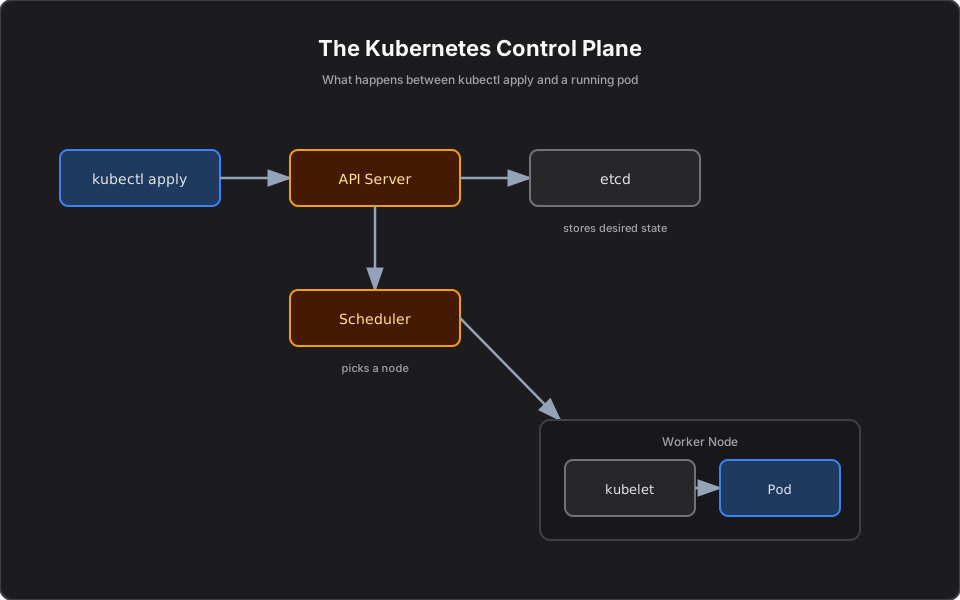
1. `kubectl apply` sends the manifest to the API server. 2. The API server authenticates, authorizes, validates, and writes the desired state to etcd. 3. The Deployment controller sees a new Deployment and creates a ReplicaSet; the ReplicaSet controller creates the required Pods (still unscheduled). 4. The Scheduler finds Nodes with enough CPU/memory and binds each Pod to a Node. 5. The target Node's kubelet pulls the image (from ECR) and starts the container, then reports the Pod as Running.
If anything stalls, you now know where to look — `kubectl describe` and `kubectl get events` surface exactly which step failed.
Finance example
You apply a Deployment update bumping the Trade API from 1.3 to 1.4. The API server records the new desired image. The Deployment controller starts a rolling update — creating new ReplicaSet Pods on 1.4 while scaling the old ones down. The Scheduler places the new Pods; kubelets pull `trade-api:1.4.0` from ECR. If the 1.4 image has a bad config and crashes, you will see it in the new Pods' events while the old Pods keep serving — exactly why rollouts are gradual.
C# example
Nothing about your service changes; you just version the image your manifest points to:
app.MapPost("/trades", async (Trade trade, ITradeService svc) =>
    await svc.Execute(trade));

public record Trade(string Symbol, int Quantity, decimal Price, DateTime ExecutedAt);
Then `kubectl apply -f trade-api.yaml` carries the new image tag through the flow above.
AWS example
On EKS the API server, etcd, scheduler, and controllers are the managed control plane that AWS operates for you. The kubelet runs on your EC2 worker Nodes and pulls images from ECR using the Node's IAM permissions. CloudWatch captures the resulting logs and events.
Architecture diagram
Production reality
Knowing this flow is what makes you fast in an incident:
- 90% of "it won't deploy" issues map to one step. Rejected at the API server (bad YAML or admission policy), stuck unscheduled (Scheduler — see Pending), or failing to start (kubelet — image pull or CrashLoopBackOff). Identify the step first, then debug.
- `kubectl apply` is not instant truth. It records intent; reconciliation is asynchronous. Tooling that checks status immediately after apply often races the controllers.
- Admission controllers and policies (OPA/Kyverno) sit in this path in regulated shops. A deploy can be rejected for missing labels, no resource limits, or a disallowed image registry — by design.
- Cost/operational: GitOps tools (Argo CD, Flux) wrap this flow so `git` is the source of desired state and apply is automated and audited — important for finance change control.
- Security: every apply is authenticated and authorized via RBAC. Audit logs of who applied what are a compliance requirement, not a nicety.
AI Engineering connection
Deploying or updating an MCP server or agent is the same apply-and-reconcile loop. When you bump an agent's image or scale its replicas, this exact chain runs — which is why GitOps is a clean fit for managing fleets of AI services declaratively.
Interview questions
- What is the first thing that happens after kubectl apply? The manifest goes to the API server, which authenticates, validates, and stores desired state in etcd.
- What role does etcd play? It is the source of truth, storing desired and current cluster state.
- Who actually starts the container? The kubelet on the Node the Scheduler selected.
- What is the difference between desired and actual state? Desired state is what you declared; actual is what is running. Controllers continuously reconcile actual toward desired.
- How do you debug a Pod that never starts? Use kubectl describe and events to find which step failed — scheduling, image pull, or container start.
Key takeaways
- `kubectl apply` records desired state; the cluster reconciles reality to match.
- The path is API server -> etcd -> controllers -> Scheduler -> kubelet -> running Pod.
- Knowing this chain turns debugging into a step-by-step checklist.
- On EKS, AWS runs the control plane; your Nodes run kubelets that pull from ECR.
Next article
Next: Kubernetes Architecture Explained Like an Airport — a mental model that makes all the components click. Previous: Understanding Pods, Deployments, and Services.
Frequently asked questions
- What happens first after kubectl apply?
- The manifest is sent to the API server, which authenticates, authorizes, validates, and stores the desired state in etcd.
- Which component actually starts the container?
- The kubelet on the Node selected by the Scheduler pulls the image and starts the container, then reports the Pod as Running.
- How do I debug a Pod that never starts?
- Use kubectl describe pod and kubectl get events to find which step failed — scheduling, image pull, or container start.
Related reading
Understanding Pods, Deployments, and Services in Kubernetes
The three Kubernetes objects you touch every day — Pods, Deployments, and Services — explained clearly with finance, C#, and AWS examples.
Kubernetes Architecture Explained Like an Airport
A memorable mental model for Kubernetes architecture: the control plane is the tower, Nodes are runways. Understand every component and how they fail.
Why Pods Get Stuck in Pending (and How to Fix It)
A Pending Pod is a scheduling problem, not an app crash. Learn the causes — capacity, taints, unbound PVCs, affinity — and how to fix each on EKS.