Understanding Pods, Deployments, and Services in Kubernetes
Summary
The three Kubernetes objects you touch every day — Pods, Deployments, and Services — explained clearly with finance, C#, and AWS examples.
Short answer: A Pod runs your container. A Deployment keeps the right number of identical Pods alive and handles rollouts. A Service gives those Pods one stable address so other apps can reach them even as individual Pods come and go. These three objects cover the majority of day-to-day Kubernetes work.
Part 3 of the series. Previous: Docker vs Kubernetes.
Introduction
If you learn only three Kubernetes objects, learn these. Almost every service you deploy is a Deployment that creates Pods, exposed by a Service. Everything else is detail layered on top.
The problem
You have a Portfolio API container. You need: several copies for resilience, automatic replacement when one dies, a safe way to ship a new version, and a fixed address callers can use even though Pods are created and destroyed constantly (each with a different IP). Raw containers give you none of this.
Simple explanation
- Pod: one running instance of your app. Disposable — it can die and be replaced at any time.
- Deployment: the manager that says "always keep 3 healthy Portfolio Pods, and here is how to roll out version 1.4." It creates and replaces Pods for you.
- Service: a stable front door. Callers talk to the Service name; it forwards to whichever Pods are currently healthy.
Official Kubernetes concept
- A Pod is the smallest deployable unit; it wraps your container(s) and shares their network/storage.
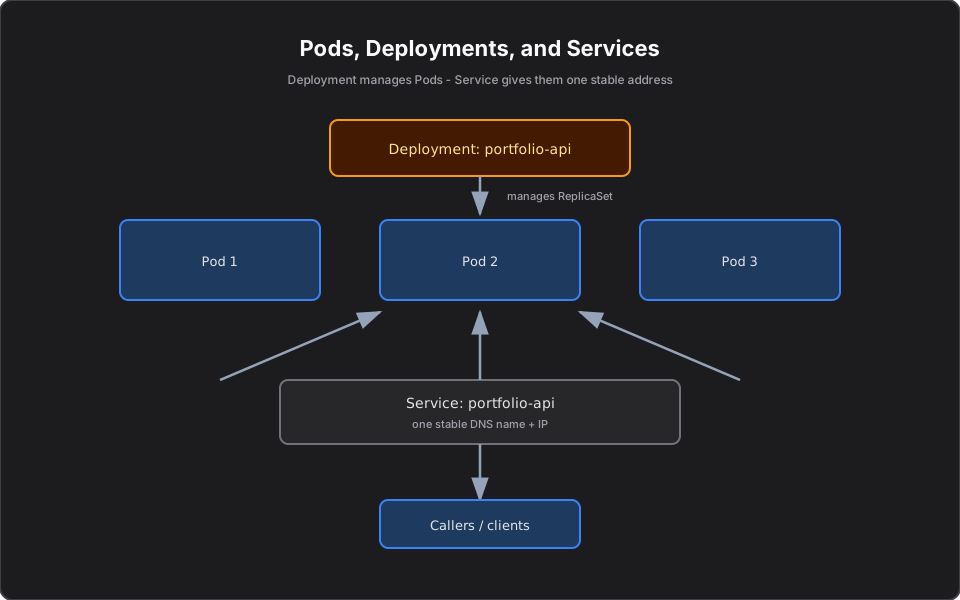
- A Deployment manages a ReplicaSet, which in turn ensures a specified number of Pod replicas are running. You almost never create ReplicaSets directly — the Deployment does it.
- A Service provides a stable virtual IP and DNS name, load balancing across the Pods that match its label selector.
How it works
You declare a Deployment with `replicas: 3` and an image. The Deployment creates a ReplicaSet, which creates 3 Pods. If a Pod dies, the ReplicaSet creates a replacement to restore the count. When you change the image to a new version, the Deployment performs a rolling update — starting new Pods and removing old ones gradually so there is no downtime.
The Service uses a label selector (for example `app: portfolio-api`) to find healthy Pods and spread traffic across them. Callers never need to know individual Pod IPs.
Finance example
Your Portfolio API serves account holdings. You run 3 replicas behind a Service named `portfolio-api`. The Trade API simply calls `http://portfolio-api/positions/{accountId}` — it never tracks Pod IPs. When you deploy version 1.4 with a new risk field, the Deployment rolls Pods one at a time; clients see no outage. If a Node fails, the lost Pods are recreated elsewhere and the Service quietly routes around the gap.
C# example
The service code is ordinary ASP.NET; the Deployment runs three copies of it:
app.MapGet("/positions/{accountId}", async (string accountId, IPortfolioService svc) =>
    await svc.GetPositions(accountId));
A minimal Deployment + Service for it:
apiVersion: apps/v1
kind: Deployment
metadata:
  name: portfolio-api
spec:
  replicas: 3
  selector:
    matchLabels: { app: portfolio-api }
  template:
    metadata:
      labels: { app: portfolio-api }
    spec:
      containers:
        - name: portfolio-api
          image: <account>.dkr.ecr.us-east-1.amazonaws.com/portfolio-api:1.4.0
          ports: [{ containerPort: 8080 }]
---
apiVersion: v1
kind: Service
metadata:
  name: portfolio-api
spec:
  selector: { app: portfolio-api }
  ports: [{ port: 80, targetPort: 8080 }]
AWS example
On EKS, a Service of type `LoadBalancer` provisions an AWS load balancer automatically, giving external callers a single endpoint. Internally, the cluster DNS resolves `portfolio-api` to the Service so your other .NET services can call it by name with no hardcoded IPs.
Architecture diagram
Production reality
In production these three objects carry most of your reliability story:
- Set `maxUnavailable`/`maxSurge` and a PodDisruptionBudget deliberately. A default rolling update can drop the Trade API below safe capacity during a deploy or Node drain. Budgets keep enough replicas serving.
- Readiness probes are non-negotiable. Without one, the Service routes traffic to a Pod that is still warming up, and clients see failures during every rollout.
- Label discipline matters. A Service finds Pods by label selector; a typo'd label silently sends traffic nowhere. This is a surprisingly common 3 a.m. incident.
- Cost: replica count is a direct cost lever. Right-size with a Horizontal Pod Autoscaler instead of pinning a high fixed count "to be safe."
- Security: run containers as non-root and scope each Deployment's service account; a compromised Pod should not be able to touch the whole cluster.
AI Engineering connection
An MCP server or AI agent is deployed with exactly these objects: a Deployment for replicas and rollouts, and a Service so AI clients reach a stable address while individual Pods are replaced. The portfolio example here maps directly onto a portfolio-insights MCP server in Running MCP Servers on Kubernetes.
Interview questions
- What is the difference between a Pod and a Deployment? A Pod is a single running instance; a Deployment manages a set of identical Pods, handling scaling, replacement, and rolling updates.
- Why do we need a Service if Pods have IPs? Pod IPs are ephemeral and change as Pods are recreated. A Service provides a stable name/IP and load balances across current healthy Pods.
- What is a ReplicaSet and do you create it directly? It ensures a set number of Pod replicas. You usually let a Deployment manage it rather than creating it directly.
- How does a rolling update avoid downtime? The Deployment brings up new Pods and terminates old ones gradually, keeping enough healthy Pods serving traffic throughout.
Key takeaways
- Pod = one instance; Deployment = manager of many identical Pods; Service = stable address.
- Deployments give you self-healing and zero-downtime rollouts via ReplicaSets.
- Services use label selectors to load balance across healthy Pods.
- Call services by name, never by Pod IP.
Next article
Next: What Happens When You Run kubectl apply? — trace one command through the whole control plane. Previous: Docker vs Kubernetes.
Frequently asked questions
- What is the difference between a Pod and a Deployment?
- A Pod is a single running instance of your app. A Deployment manages a set of identical Pods, handling scaling, replacement, and zero-downtime rolling updates.
- Why do I need a Service if Pods already have IPs?
- Pod IPs are ephemeral and change as Pods are recreated. A Service provides a stable name and IP and load balances across the currently healthy Pods.
- What is a ReplicaSet?
- A ReplicaSet ensures a specified number of Pod replicas are running. You normally let a Deployment manage the ReplicaSet rather than creating it directly.
Related reading
Docker vs Kubernetes: What's the Difference?
Docker packages one container; Kubernetes runs many across machines. A clear, practical explanation of how they fit together, with finance, C#, and AWS examples.
What Happens When You Run kubectl apply?
Trace one kubectl apply command through the API server, etcd, controllers, scheduler, and kubelet — so debugging becomes a step-by-step checklist.
Kubernetes Networking Explained for Developers
How traffic reaches your Pods: Services, ClusterIP, Ingress, and cluster DNS explained without the iptables deep-dive. With finance, C#, and AWS examples.