Docker vs Kubernetes: What's the Difference?
Summary
Docker packages one container; Kubernetes runs many across machines. A clear, practical explanation of how they fit together, with finance, C#, and AWS examples.
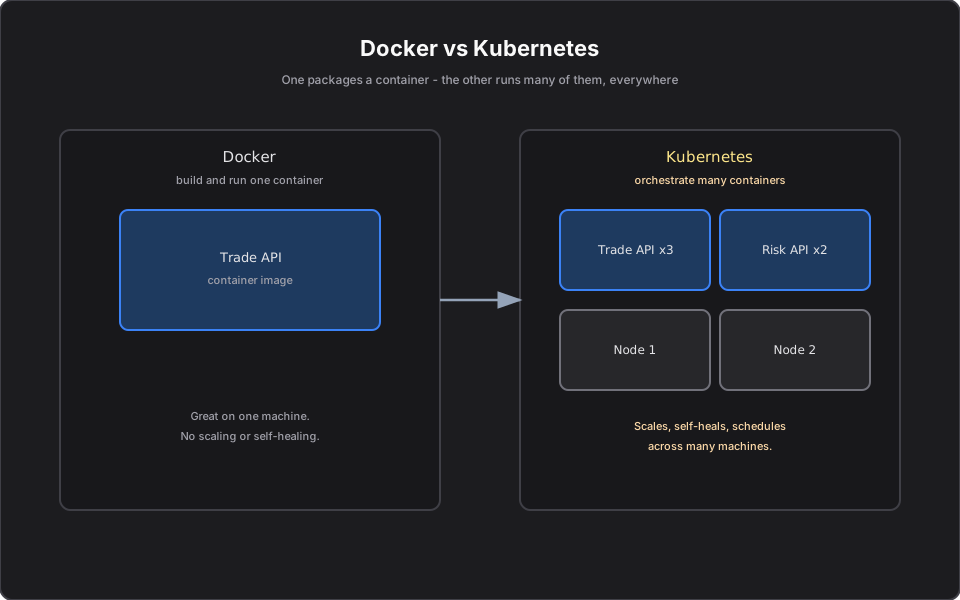
Short answer: Docker packages and runs one container. Kubernetes runs many containers across many machines and keeps them healthy. They are not competitors — Docker builds the box, Kubernetes runs a fleet of boxes. As an engineer, you use Docker to create your image and Kubernetes to operate it in production.
This is part 2 of a practical Kubernetes series. If you are new here, start with What Is Kubernetes?.
Introduction
"Docker vs Kubernetes" is one of the most common interview and hallway questions, and it is slightly the wrong question. They solve different problems at different layers. Understanding where one ends and the other begins removes a lot of confusion.
The problem
You containerize your Trade Execution API with Docker. On your laptop it runs perfectly. Now production needs five copies, automatic restarts when one dies, rolling updates with no downtime, and traffic spread evenly across copies. Docker alone does none of that across a fleet — it runs containers on a single host. Something has to coordinate containers across many machines. That something is an orchestrator.
Simple explanation
- Docker is like a shipping container: a standard box that holds your app and everything it needs, so it runs the same everywhere.
- Kubernetes is the port and the crane system: it decides which ship (Node) each container goes on, replaces lost containers, and routes trucks (traffic) to them.
You almost always use both. Docker (or another container runtime) builds the image; Kubernetes schedules and supervises it.
Official Kubernetes concept
The key terms:
- Container image: the packaged app Docker produces.
- Container runtime: the software that actually runs a container on a Node (Docker historically; today usually containerd under the hood).
- Orchestrator: the system that places and manages containers across Nodes. Kubernetes is the dominant one.
Kubernetes does not replace Docker's build step — it consumes the image Docker produces and runs it as Pods.
How it works
The lifecycle in one line: build with Docker, store in a registry, run with Kubernetes.
1. `docker build` turns your code and Dockerfile into an image. 2. `docker push` (or a CI pipeline) uploads it to a registry such as Amazon ECR. 3. Kubernetes pulls that image and runs it as Pods on Nodes, handling scaling, restarts, and networking.
Docker's job ends at the image. Kubernetes' job begins at running it reliably at scale.
Finance example
Your Risk Calculation Service is CPU-heavy at market close. With only Docker you would manually start extra containers on extra servers and manually load balance — and manually clean up afterward. With Kubernetes you declare a desired replica count and an autoscaling rule; the cluster runs more Risk pods at close and fewer overnight, restarts any that crash, and keeps a single Service address in front of them. Docker still built the image; Kubernetes runs the fleet.
C# example
The same Dockerfile you already use to containerize an ASP.NET service is what Kubernetes runs:
FROM mcr.microsoft.com/dotnet/aspnet:9.0 AS base
WORKDIR /app
COPY ./publish .
ENTRYPOINT ["dotnet", "TradeApi.dll"]
Build and push once:
docker build -t trade-api:1.4.0 .
docker tag trade-api:1.4.0 <account>.dkr.ecr.us-east-1.amazonaws.com/trade-api:1.4.0
docker push <account>.dkr.ecr.us-east-1.amazonaws.com/trade-api:1.4.0
From here, Kubernetes references that exact image tag and takes over running it.
AWS example
- Docker side: build the image, store it in Amazon ECR.
- Kubernetes side: Amazon EKS pulls from ECR and runs Pods on EC2 Nodes.
- If you only need to run a few containers without learning Kubernetes, AWS ECS (or Fargate) can orchestrate Docker containers too — we compare ECS and EKS later in the series.
Architecture diagram
Production reality
What separates a working demo from a production setup:
- The classic mistake is lifting a single-host `docker compose` file straight into production and assuming you are done. You still need health probes, resource limits, and a rollout strategy — that is the Kubernetes layer.
- Image hygiene is an operational cost. Fat images slow Node image pulls and cold starts during scale-up at market open. Use multi-stage builds and slim base images.
- Build once, promote the same artifact. Rebuilding per environment causes drift and breaks audit trails. The image that passed staging is the exact image that goes to prod, by digest.
- Security: scan images in ECR, pin tags (never `:latest` in production), and give Nodes least-privilege pull permissions.
- Cost: orchestration is not free. For one to three services, an orchestrator's overhead may exceed its benefit — see ECS vs EKS.
AI Engineering connection
AI infrastructure ships the same way. You containerize an MCP server or agent with Docker, push it to ECR, and let Kubernetes run and scale many replicas. The build-versus-run split is identical whether the container serves trades or tool calls — which is why running MCP servers on Kubernetes is just this pipeline applied to AI.
Interview questions
- Is Kubernetes a replacement for Docker? No. Docker builds and packages containers; Kubernetes orchestrates running containers across many machines. They operate at different layers.
- Does Kubernetes still use Docker? It uses a container runtime (commonly containerd). You can still build images with Docker; Kubernetes just needs a compliant runtime to run them.
- Why not just run Docker in production? A single Docker host gives you no cross-machine scheduling, self-healing, rolling updates, or service discovery at fleet scale — that is what an orchestrator adds.
- What is the minimum you need to deploy a .NET app to Kubernetes? A container image in a registry and Kubernetes manifests (Deployment + Service) referencing that image.
Key takeaways
- Docker = build and package one container. Kubernetes = run and operate many.
- The pipeline is build (Docker) -> store (registry/ECR) -> run (Kubernetes/EKS).
- They are complementary, not competing.
- For small workloads, ECS can orchestrate containers without full Kubernetes.
Next article
Next: Understanding Pods, Deployments, and Services — the three objects you will touch every single day. Previous: What Is Kubernetes?.
Frequently asked questions
- Is Kubernetes a replacement for Docker?
- No. Docker builds and packages containers; Kubernetes orchestrates running containers across many machines. They work at different layers and are typically used together.
- Does Kubernetes still use Docker?
- Kubernetes runs containers through a container runtime (commonly containerd). You can still build images with Docker; Kubernetes just needs a compliant runtime to run them.
- Do I need both Docker and Kubernetes?
- Usually yes: Docker to build the image and a registry to store it, and Kubernetes to run and operate it at scale. For small workloads, AWS ECS can orchestrate containers without Kubernetes.
Related reading
What Is Kubernetes? A Simple Explanation for Software Engineers
A practical, no-fluff explanation of Kubernetes for software engineers — what problem it solves, how Pods, Nodes, and the control plane work, with finance, C#, and AWS examples.
Understanding Pods, Deployments, and Services in Kubernetes
The three Kubernetes objects you touch every day — Pods, Deployments, and Services — explained clearly with finance, C#, and AWS examples.
ECS vs EKS: Which AWS Container Service Should You Use?
A clear decision framework for ECS vs EKS — simplicity versus the Kubernetes ecosystem — so you pick the right AWS container service instead of defaulting to one.