What Is Kubernetes? A Simple Explanation for Software Engineers
Summary
A practical, no-fluff explanation of Kubernetes for software engineers — what problem it solves, how Pods, Nodes, and the control plane work, with finance, C#, and AWS examples.
Short answer: Kubernetes is the software that runs your application's containers for you — it decides which machine each container lands on, restarts it when it crashes, scales it up under load, and keeps it reachable. As a software engineer, you care because it turns "deploy my service and keep it alive" from a manual, fragile chore into a declarative system you describe once and let the cluster maintain.
This is part 1 of a practical Kubernetes series written for engineers who build services, not for full-time cluster administrators.
Introduction
Most of us learned to run an app like this: build it, copy it to a server, start the process, and hope it stays up. That works until you have ten services, three environments, traffic spikes at market open, and a 2 a.m. page because one box died. Kubernetes exists to make that pain go away. Before we touch a single line of YAML, the goal of this article is to answer one question: why should a software engineer care about Kubernetes at all?
The problem
Imagine you run a small fleet of finance microservices: a Portfolio API, a Trade Execution API, a Market Data service, and a Risk service. In a pre-Kubernetes world you have to answer, by hand, questions like:
- Which server does each service run on?
- What happens when that server dies at midnight?
- How do I run five copies of the Trade API at market open and one copy overnight?
- How does the Portfolio API find the Market Data service when its IP keeps changing?
- How do I roll out a new version without taking the service down?
Every team eventually writes a pile of scripts to answer these. Those scripts are brittle, undocumented, and different at every company. Kubernetes is the industry's shared answer to all of these questions at once.
Simple explanation
Think of Kubernetes as an operations manager for your containers. You do not tell it how to do its job step by step. You tell it the desired end state — "I want three healthy copies of the Trade API running at all times" — and it works continuously to make reality match that statement.
If a copy dies, it starts a new one. If a whole machine dies, it moves the work elsewhere. If you ask for five copies, it finds room for five. You declare intent; Kubernetes does the babysitting.
Official Kubernetes concept
A few terms you will use constantly, introduced in plain order:
- A container is your packaged app (we will compare Docker and Kubernetes in the next article).
- The smallest thing Kubernetes runs is a Pod — a wrapper around one (occasionally a few tightly-coupled) containers.
- A worker machine that runs Pods is a Node (on AWS, an EC2 instance).
- The whole set of Nodes plus the brain that manages them is a Cluster.
- The brain is the control plane, and its memory — the record of desired state — lives in a key-value store called etcd.
You describe what you want, the control plane stores it, and components on each Node make it happen. That continuous "make reality match the desired state" loop is the single most important idea in Kubernetes.
How it works
At a high level, the control plane runs three pieces you should know by name:
- The API server is the front door. Every request — yours, the dashboard's, internal components' — goes through it.
- The Scheduler decides which Node a new Pod should run on, based on available CPU and memory.
- etcd stores the desired and current state.
On every Node, two agents do the local work:
- The kubelet is the on-Node supervisor. It starts the containers the control plane assigned and reports health back.
- kube-proxy handles the networking plumbing so traffic can reach the right Pod.
When you say "run three Trade APIs," the API server records that, the Scheduler places three Pods onto Nodes, and each Node's kubelet pulls the image and starts the container. If one dies, the control plane notices the gap between desired (3) and actual (2) and creates a replacement. Nobody pages you.
Finance example
Take a trading platform at market open. Volume spikes 10x for 30 minutes, then settles. Without orchestration you would over-provision servers all day to survive that half hour. With Kubernetes you declare that the Trade Execution API should scale between 2 and 20 Pods based on CPU, and the cluster adds Pods when load climbs and removes them when it falls.
If a Node hosting part of your Portfolio API fails mid-session, Kubernetes reschedules those Pods onto healthy Nodes within seconds — the on-call engineer keeps sleeping, and clients keep seeing their positions. That resilience is the entire reason regulated, high-availability finance workloads adopt it.
C# example
Your services do not change much to run on Kubernetes. A normal ASP.NET minimal API is enough:
var builder = WebApplication.CreateBuilder(args);
var app = builder.Build();

app.MapGet("/positions/{accountId}", async (string accountId, IPortfolioService svc) =>
    await svc.GetPositions(accountId));

// Kubernetes uses this to know the Pod is alive and ready for traffic.
app.MapGet("/healthz", () => Results.Ok("healthy"));

app.Run();
The one habit worth forming early: expose a health endpoint. Kubernetes calls it (via a liveness/readiness probe) to decide whether your Pod is healthy and whether it should receive traffic. Your business records stay exactly as they are:
public record PortfolioPosition(string Symbol, int Quantity, decimal AverageCost);The service is unchanged. What changes is who runs it and keeps it alive — that is now the cluster's job, not a deploy script's.
AWS example
On AWS the pieces map cleanly:
| You need | AWS service |
|---|---|
| Store the container image | Amazon ECR |
| Run a managed Kubernetes cluster | Amazon EKS |
| Worker machines for Pods | EC2 (or Fargate) |
| Expose a Service to the internet | Elastic Load Balancer |
| App and cluster logs/metrics | CloudWatch |
| Database passwords, API keys | Secrets Manager |
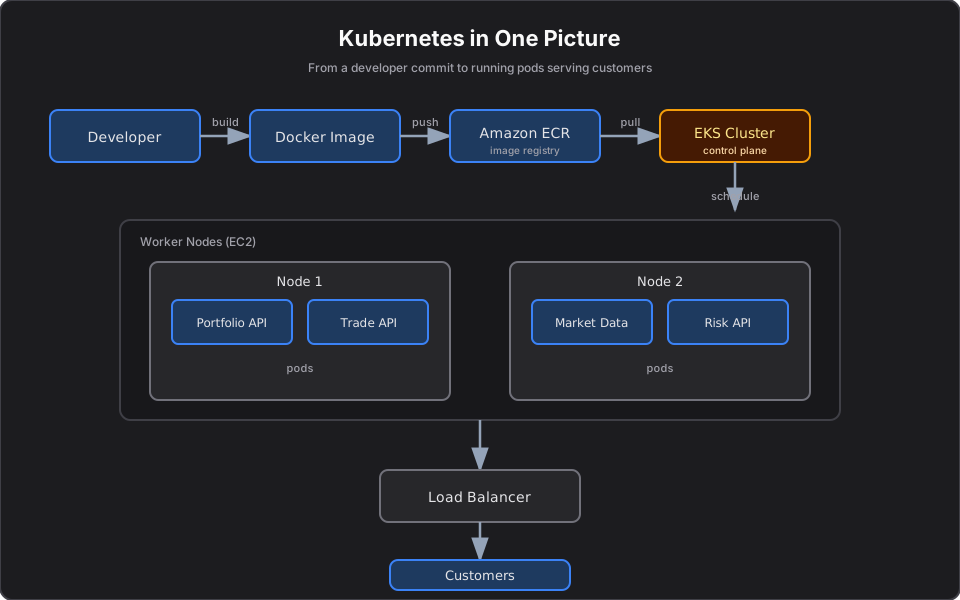
The typical flow: you build a Docker image, push it to ECR, and EKS pulls it and schedules Pods onto EC2 Nodes. A load balancer fronts the Pods so customers reach your Trade API. We will go deep on EKS for .NET developers later in this series.
Architecture diagram
Production reality
In real enterprises, the gap between "Kubernetes works on my cluster" and "Kubernetes works in production" is mostly operational discipline:
- The most common mistake is no resource requests/limits. Without them, one busy service starves its neighbors on the same Node, and the Scheduler cannot place Pods sensibly. Set them deliberately from day one.
- Self-managing the control plane is a trap. Running and patching etcd and the API server yourself is real, thankless work. Most finance teams use a managed control plane (EKS) precisely to avoid it.
- Cost is a design decision. Idle Nodes cost money 24/7. Without autoscaling you pay for peak (market-open) capacity around the clock. Pair Pod autoscaling with Node autoscaling.
- Secrets in plain manifests is the classic security failure. Pull credentials from AWS Secrets Manager via IRSA, never bake them into images or YAML.
- A cluster nobody understands becomes the incident. Treat the platform as a product with owners, runbooks, and on-call — not a science project.
AI Engineering connection
This matters beyond classic microservices: the exact same platform that keeps your Trade API alive is where modern AI infrastructure runs. MCP servers, AI agents, and self-hosted models are just Pods with the same scaling, self-healing, and secret-management needs. This series ends by running MCP servers and AI agents on exactly this foundation.
Interview questions
- What problem does Kubernetes actually solve? It automates deployment, scaling, networking, and self-healing of containers so you declare desired state instead of manually managing servers.
- What is the difference between a Pod and a container? A container is your packaged app; a Pod is the smallest deployable unit Kubernetes manages and usually wraps a single container, sharing its network and storage.
- What is the control plane responsible for? Storing desired state (etcd), exposing the API server, and scheduling Pods onto Nodes while continuously reconciling actual state toward desired state.
- What does the kubelet do? It runs on each Node, starts the containers assigned to that Node, and reports their health back to the control plane.
- Why is Kubernetes called declarative? You describe the end state you want; Kubernetes figures out the steps and keeps correcting drift, rather than you issuing imperative commands.
Key takeaways
- Kubernetes runs and supervises your containers so you describe desired state, not manual steps.
- The smallest unit you run is a Pod; Pods run on Nodes; Nodes plus the control plane form a Cluster.
- The control plane (API server, Scheduler, etcd) decides what should run; the kubelet and kube-proxy on each Node make it happen.
- For finance workloads, the payoff is self-healing and elastic scaling during volatile market hours.
- On AWS, this is ECR for images and EKS for the managed cluster.
Next article
Next: Docker vs Kubernetes — why containers alone are not enough, and where one ends and the other begins. You can also see how these ideas show up in real AI systems in From AI Model Consumer to AI Application Builder and Deploying MCP Servers: Stdio, HTTP, and Approval Gates.
Frequently asked questions
- What is Kubernetes in simple terms?
- Kubernetes is software that runs and supervises your application's containers. You declare the desired state — for example, three healthy copies of a service — and Kubernetes schedules them onto machines, restarts them when they crash, scales them under load, and keeps them reachable.
- Do software engineers need to learn Kubernetes?
- You do not need to administer clusters, but understanding Pods, Nodes, the control plane, health probes, and how your service is deployed makes you far more effective at shipping, debugging, and scaling production services.
- What is the difference between a Pod and a container?
- A container is your packaged application. A Pod is the smallest unit Kubernetes deploys and manages; it usually wraps a single container and gives it a shared network and storage context.
- How does Kubernetes relate to AWS?
- On AWS you typically store container images in Amazon ECR and run a managed Kubernetes cluster with Amazon EKS, which schedules Pods onto EC2 worker nodes. Load balancers, CloudWatch, and Secrets Manager handle traffic, observability, and secrets.
Related reading
Docker vs Kubernetes: What's the Difference?
Docker packages one container; Kubernetes runs many across machines. A clear, practical explanation of how they fit together, with finance, C#, and AWS examples.
Understanding Pods, Deployments, and Services in Kubernetes
The three Kubernetes objects you touch every day — Pods, Deployments, and Services — explained clearly with finance, C#, and AWS examples.
Kubernetes Architecture Explained Like an Airport
A memorable mental model for Kubernetes architecture: the control plane is the tower, Nodes are runways. Understand every component and how they fail.