From AI Model Consumer to AI Application Builder
Summary
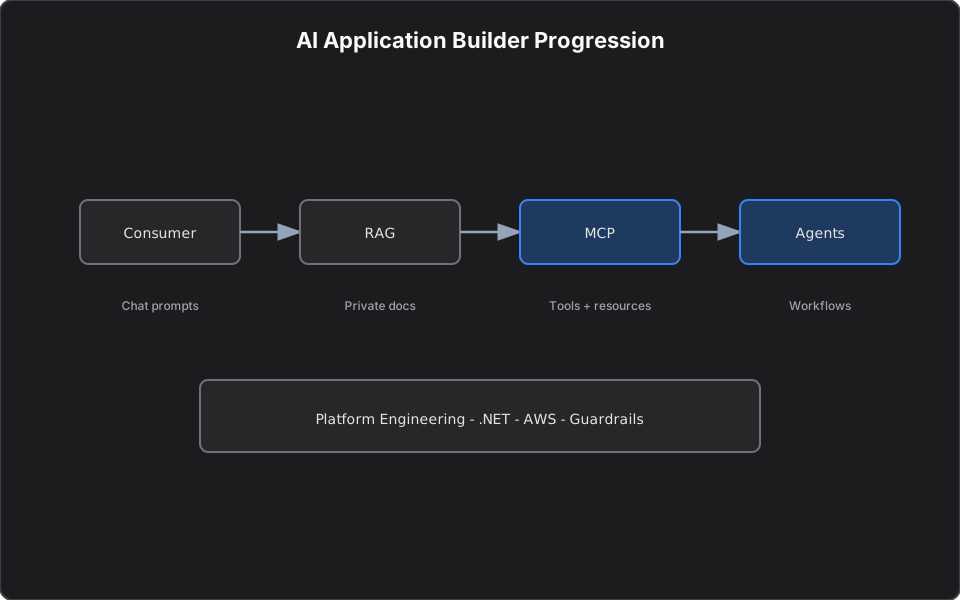
A practical guide for .NET engineers moving from chat prompts to RAG, MCP servers, agents, and agentic workflows — with security patterns, architecture diagrams, and platform mental models.
Most engineering teams are still AI model consumers. They use chat interfaces, autocomplete, and ad hoc prompts — then copy context from issue trackers, repositories, and log systems by hand. That improves individual productivity. It does not yet change how the organization builds software.
This article explains the progression from AI Consumer to AI Application Builder and AI Workflow Builder, with mental models that map cleanly onto .NET, APIs, NuGet packages, and enterprise platform engineering. If you build AI platform workflows or ship products like Blanket Finance, the same patterns apply: rules, retrieval, tools, agents, and human review.
Introduction
Why most engineers are still AI consumers.
The default pattern today is simple:
Developer → AI Tool → AnswerExamples include asking a chat model a question, using IDE autocomplete, creating editor rules, generating unit tests once, explaining a method, or summarizing logs after manual copy/paste. Each action helps one person in one moment.
The bigger opportunity is different:
Developer request
→ AI understands intent
→ Retrieves internal knowledge
→ Calls approved tools
→ Follows rules and permissions
→ Executes workflow steps
→ Produces useful output
That shift — from using AI tools to building AI-powered engineering workflows — is what separates consumers from application builders. Learn more about my background on the About page and project work.
The Four Levels of AI Adoption
Level 1: AI Consumer
You use public or hosted models through chat UIs. Value is real but bounded: no connection to your systems, no team-wide standards, no repeatable workflows.
Examples: one-off prompts, copy/paste from logs, generic test generation without repo context.
Level 2: AI-Assisted Developer
You standardize how AI behaves in the IDE through rules and skills. Output becomes more consistent; tasks become repeatable.
Examples: team coding standards in rules files, reusable skills for test generation, PR review checklists, release-note templates.
Level 3: AI Application Builder
You build small applications around models: retrieval pipelines, tool servers, internal assistants with guardrails. AI connects to your knowledge and your APIs.
Examples: documentation assistant over internal wiki, RAG over architecture docs, MCP servers for log investigation and test scaffolding.
Level 4: AI Workflow Builder
You orchestrate multi-step processes where agents retrieve context, call tools, propose actions, and pause for human approval.
Examples: bug triage that gathers logs and docs, suggests a fix, generates tests, and opens a PR for review.
| Level | Focus | Typical artifact |
|---|---|---|
| 1 — Consumer | Personal productivity | Chat sessions |
| 2 — Assisted Developer | Standardized behavior | Rules, skills |
| 3 — Application Builder | Connected systems | RAG apps, MCP servers |
| 4 — Workflow Builder | End-to-end automation | Agentic pipelines with review gates |
Traditional ML vs Generative AI
Traditional ML model thinking
Most developers understand traditional ML as a prediction function:
var prediction = model.Predict(input);| Use case | Output |
|---|---|
| House price prediction | Numeric value |
| Fraud detection | Fraud / Not Fraud |
| Spam detection | Spam / Not Spam |
| Demand forecasting | Future quantity |
Typical flow: Historical Data → Feature Engineering → ML Model → Prediction. Success is measured with accuracy, precision, recall, F1, RMSE, or AUC.
Traditional ML answers: "What is the predicted output for this input?"
What changed with Generative AI?
Generative models produce new content — text, code, SQL, summaries, test cases, plans, explanations, and workflow steps.
var response = await chatClient.GetResponseAsync(
    "Create NUnit tests for this ASP.NET Core controller");
New flow: Prompt → Context → Tokens → Transformer Model → Generated Output.
Generative AI answers: "Given this instruction and context, what should be generated next?"
That mindset shift is why prompting, context windows, retrieval, and tool access matter as much as model choice.
Important GenAI Concepts
Prompt
A prompt is the instruction you give the model. Strong prompts include goal, context, constraints, output format, and examples.
Token
Models split text into tokens. Tokens affect cost, speed, context limits, and maximum response length.
Context window
The context window is everything the model can consider at once: system instructions, user question, source code, error logs, ticket text, API documentation, schema notes, prior conversation, and tool results.
Example: "Why is this API failing?" Useful context includes controller and service code, recent logs, stack traces, related ticket, and deployment history. Good context improves answers; noisy context produces confident wrong answers.
Transformer
Transformers learn relationships between tokens — which is why modern LLMs can reason about C#, ASP.NET Core, HTTP, async/await, dependency injection, and unit testing in the same session.
NLP evolution
| Era | Capability |
|---|---|
| Classical NLP | Keyword search, sentiment, classification, intent detection |
| Modern LLMs | Summarize, explain, generate code, debug, plan, use tools, participate in workflows |
Why Generative AI Alone Is Not Enough
A base model does not automatically know:
- Your internal APIs and service boundaries
- Issue tracker history
- Repository structure and recent commits
- Production logs and deployment history
- Team coding standards and architecture decisions
- Database schemas and runbooks
Without retrieval or tools, engineers fall back to manual context gathering:
Open issue tracker → Copy ticket
Open repository → Copy code
Open observability → Copy logs
Paste into chat → Ask for help
That works for one developer. It does not scale across a team.
Key insight: Rules, skills, RAG, MCP, agents, and agentic workflows exist to close the context, knowledge, and tool-access gaps.
Rules, Skills, RAG, MCP, Agents, and Agentic Workflows
Rules
Rules define boundaries and standards — like coding guidelines for AI.
- Use async/await and structured logging
- Never expose secrets in generated code
- Follow existing API response patterns
- Use NUnit and Moq for tests
- Respect dependency injection conventions
In Cursor, rules often live in `.cursor/rules/*.mdc` with YAML frontmatter, applied always or scoped to file globs.
Skills
Skills package repeatable task knowledge: create an API endpoint, generate unit tests, analyze logs, write release notes, review a PR, explain a service flow.
Skills are procedural playbooks the agent invokes when a task matches.
Limitation of rules and skills alone
Rules and skills improve behavior but do not automatically connect AI to enterprise systems. If the model cannot read tickets, repos, logs, or build status, the developer still supplies context manually.
| Layer | Location | Executes? | Role |
|---|---|---|---|
| Rules | `.cursor/rules/*.mdc` | No | Constraints and standards |
| Skills | `SKILL.md` | No | Multi-step playbooks |
| MCP Server | MCP client config | Yes | Tools with side effects |
Compose all three: rules set guardrails, skills route workflows, MCP tools read systems and write scoped outputs.
RAG Explained for .NET Developers
RAG (Retrieval-Augmented Generation) grounds answers in your documents before the model responds.
Without RAG:  Question → LLM → Answer
With RAG:     Question → Retrieve → Add context → LLM → Grounded answer
RAG fits architecture docs, API references, runbooks, design documents, support articles, and policy text.
RAG pipeline
Steps for .NET teams
1. Load documents — wiki pages, markdown in repos, PDFs, OpenAPI specs, runbooks 2. Chunk content — sections small enough to retrieve, large enough to mean something; attach metadata (title, URL, owner, system, last updated) 3. Create embeddings — text → vectors; similar meaning → similar vectors 4. Store in a vector database — PostgreSQL + pgvector, Azure AI Search, Qdrant, Redis vector search, etc. 5. Retrieve relevant chunks at query time 6. Build the final prompt — system instructions + user question + retrieved chunks 7. Generate the answer — with source references and clear limitations
var question = "How does vendor API authorization work in our platform?";
var questionEmbedding = await embeddingService.GenerateAsync(question);
var relevantChunks = await vectorStore.SearchAsync(questionEmbedding, topK: 5);
var prompt = promptBuilder.Build(systemInstructions, question, relevantChunks);
var answer = await chatClient.GetResponseAsync(prompt);
For a deeper dive on private RAG architecture, see Private RAG Systems Without External APIs.
MCP Explained for Software Engineers
MCP (Model Context Protocol) is a standard way for AI clients and agents to call tools — methods that reach APIs, logs, repositories, and other systems.
One sentence: MCP is an API contract between AI clients and real systems.
| Concept | C# / .NET analogy |
|---|---|
| MCP Host | IDE or agent runtime (runs the LLM + MCP client) |
| MCP Server | Tool layer exposing .NET or Python methods to AI |
| Tool | Strongly typed operation with schema and permissions |
Normal application:
Web App → REST API → DatabaseMCP server:
AI Client / Agent → MCP Server → Tool or SystemThe LLM does not touch logs or databases directly:
LLM decides it needs a tool
→ MCP client requests execution
→ MCP server validates and runs the tool
→ Result returns to the LLM
→ LLM uses the result in its answer
Generic MCP server portfolio (by persona)
| Persona | Server | Primary tools | Problem solved |
|---|---|---|---|
| Developer | Test Generation MCP | resolve scope, write tests, run tests | Generate and run unit tests from diff or endpoint |
| Developer | Documentation MCP | fetch cached docs, search specs | Ground answers in approved documentation |
| QA | API Test Writer MCP | resolve API scope, write feature files, run tests | Create API automation from conventions |
| DevOps | Log Investigation MCP | investigate export, search entries, analyze errors | Triage production logs without one-off scripts |
| DevOps | Deployment Analysis MCP | validate dashboard JSON, analyze metrics | Build and validate observability assets |
| Architect | Service Discovery MCP | get service info, search docs | Find ownership, endpoints, dependencies |
| Product | User Segmentation MCP | estimate segment sizes, split large audiences | Plan marketing or batch jobs before execution |
| All roles | Documentation MCP | fetch URL with cache | Cache and revalidate external docs |
Package MCP servers like NuGet libraries: shared platform teams publish servers; product teams consume them through MCP client configuration instead of rebuilding integrations.
Conceptual C# tool examples
[McpServerTool]
[Description("Run analysis pipeline on a production log export")]
public async Task<string> InvestigateLogFile(
    string filePath,
    CancellationToken ct = default)
{
    return await logAnalysisPipeline.RunAsync(filePath, ct);
}

[McpServerTool]
public async Task<ServiceInfo> GetServiceInfo(
    string serviceName,
    CancellationToken ct = default)
{
    return await serviceRegistry.LookupAsync(serviceName, ct);
}
Read-only vs write-enabled tools
| Classification | Examples |
|---|---|
| Read-only | Log investigation, service lookup, doc cache, dashboard validate |
| Scoped writes | Write test files (test directories only), generate draft docs |
| Write with confirmation | Vendor or client onboarding apply step requiring explicit `confirmed: true` |
Important rule: Do not give AI more access than the user should have.
What to Figure Out Before Building an MCP Server
1. What pain are we solving? Good: "Engineers spend 45 minutes gathering context before triage." Bad: "We want MCP because it is new." 2. What systems should AI access? Start with systems developers already open manually. 3. Read-only or write-enabled? Start read-only; add writes with approval flows. 4. What permissions are required? RBAC, least privilege, audit logging, secret management, rate limits, data masking. 5. What are the tool contracts? Name, description, input/output schema, timeout, read/write class, audit requirement. 6. What should not be exposed? Raw production DB writes, secrets, unmasked PII, unbounded queries, dangerous admin operations. 7. How will we measure success? Time saved in triage, fewer repeated questions, faster PRs, better test coverage, onboarding speed — not vanity token counts.
Prefer bounded tools:
Bad:  RunSql(query)
Good: investigate_log_file(filePath), get_service_info(serviceName)
Rules vs Skills vs MCP vs Agents vs Agentic Workflows
| Type | Simple meaning | .NET mental model | Example |
|---|---|---|---|
| Rules | Boundaries | Coding standard | Always use async/await |
| Skill | Repeatable know-how | Playbook | Generate NUnit tests for a service |
| Tool / Function | Callable operation | Method or API | investigate_log_file(path) |
| MCP Server | Tool server for AI | API layer for agents | Log Investigation MCP |
| RAG | Knowledge retrieval | Search before answer | Retrieve architecture docs |
| Agent | Goal-driven worker | Background service with tools | Bug triage agent |
| Agentic Workflow | Multi-step process | Orchestrated pipeline | Ticket → logs → fix → tests → PR |
| Evaluator | Quality gate | Validator / reviewer | Check answer against sources |
Simple mental model
- Rules tell AI how to behave
- Skills tell AI how to perform repeatable tasks
- RAG gives AI knowledge
- MCP gives AI controlled access
- Agents use knowledge and tools to complete work
- Agentic workflows connect steps into an end-to-end process
RAG vs MCP
| Topic | RAG | MCP |
|---|---|---|
| Main purpose | Retrieve knowledge | Use tools and live systems |
| Best for | Docs, policies, architecture notes | Logs, repos, APIs, builds |
| Data type | Mostly text | Tool calls and live data |
| Example question | What does the architecture doc say? | What failed in this API log export? |
| Output | Grounded answer | Tool result or action |
| Risk level | Usually lower | Higher when tools can write |
Summary: RAG gives the AI knowledge. MCP gives the AI access. Agents combine both to perform work.
Building AI Engineering Platforms
Platform teams can productize AI the same way they productize CI templates or shared libraries.
| Use case | Pattern |
|---|---|
| Documentation assistant | RAG + doc cache MCP |
| Test generation | Skills + Test Generation MCP |
| Bug investigation | Log Investigation MCP + service discovery |
| Production triage | Read-only MCP tools + runbook RAG |
| Release notes | Skill + issue tracker read tool |
| Onboarding assistant | RAG over architecture + service catalog MCP |
The goal is not replacing developers. It is reducing repetitive context gathering and improving system awareness under explicit guardrails.
Example Agentic Workflow
Manual flow today
Developer opens ticket
→ Reads report
→ Searches repository
→ Checks logs in observability
→ Reviews recent deployment
→ Reads documentation
→ Asks AI for help
→ Creates fix, tests, PR
With RAG + MCP + agent
1. Agent calls Service Discovery MCP for ownership and endpoints 2. Agent runs Log Investigation MCP on an export 3. Agent retrieves runbook content via RAG or Documentation MCP 4. Agent uses Test Generation MCP for scoped test files 5. Engineer reviews before merge
Example Architecture
Security Considerations
- Least privilege — scope tools to what the user may access
- RBAC — map tool permissions to enterprise identity
- Approval flows — require explicit confirmation for writes
- Audit logging — record tool name, user, inputs (redacted), timestamp
- Human-in-the-loop — agents propose; engineers approve merges and deployments
- No unbounded queries — cap result sizes and execution time
- Data masking — strip PII from log and ticket payloads where possible
Final Takeaways
The real transition:
AI Model Consumer
→ AI-Assisted Developer
→ AI Application Builder
→ AI Workflow Builder| From | To |
|---|---|
| Using AI tools | Standardizing AI behavior |
| Individual chat sessions | Connecting AI to enterprise systems |
| Copy/paste context | Building AI-powered engineering workflows |
For C# and .NET developers, MCP is not magic. It is a structured way to expose tools and APIs to AI clients using patterns you already know: strong contracts, dependency injection, package boundaries, and code review.
Rules guide behavior. Skills package repeatable work. RAG helps AI know. MCP helps AI access and act — safely. Agents combine everything into workflows worth trusting.
The engineers who move up this curve will not just prompt models faster. They will build the platforms their teams run on.
References
- Model Context Protocol — Microsoft Learn
- Build and publish a minimal MCP server using C#
- AI tool calling in .NET
- Private RAG Systems Without External APIs — companion article on retrieval architecture
- Projects — platform engineering and AI workflow work
Hands-on tutorial series (C# / .NET)
Code-first companions inspired by *Hands-On Model Context Protocol for C# and .NET Developers*:
1. Building Your First MCP Server in C# and .NET 2. MCP Tools, Resources, and Prompts Explained 3. Deploying MCP Servers: Stdio, HTTP, and Approval Gates
For finance-specific patterns, see Building Finance MCP Servers.
Related reading
Embeddings and Vector Databases: The Search Layer Behind Real AI Applications
Embeddings convert meaning into vectors; vector databases make those vectors searchable. Together they form the retrieval foundation behind RAG, semantic search, and enterprise AI assistants.
RAG vs Graph RAG vs Agentic RAG: How to Choose the Right Architecture
Standard RAG, Graph RAG, and Agentic RAG all connect LLMs to private data — but they solve different problems. Match the architecture to the question: retrieval, relationships, or reasoning.
Building Your First MCP Server in C# and .NET
Tutorial: expose product catalog search to AI hosts with the ModelContextProtocol NuGet package — compare manual HTTP integration vs MCP tools using enterprise domain models and Cursor setup.