MCP Tools, Resources, and Prompts in C#: A Hands-On Tutorial
Summary
Hands-on C# patterns for enterprise MCP servers — support ticket tools, customer profile resource URIs, documentation prompts, and contract testing with platform-domain examples.
Chapter 2 of the Hands-On MCP for C# and .NET guide introduces three MCP primitives beyond basic tools: resources (read structured data by URI), prompts (pre-built message templates), and versioning patterns. This article maps those ideas to enterprise systems — customer profiles, support tickets, inventory updates, and internal documentation.
Start with Building Your First MCP Server in C# and .NET if you have not yet exposed a catalog search tool.
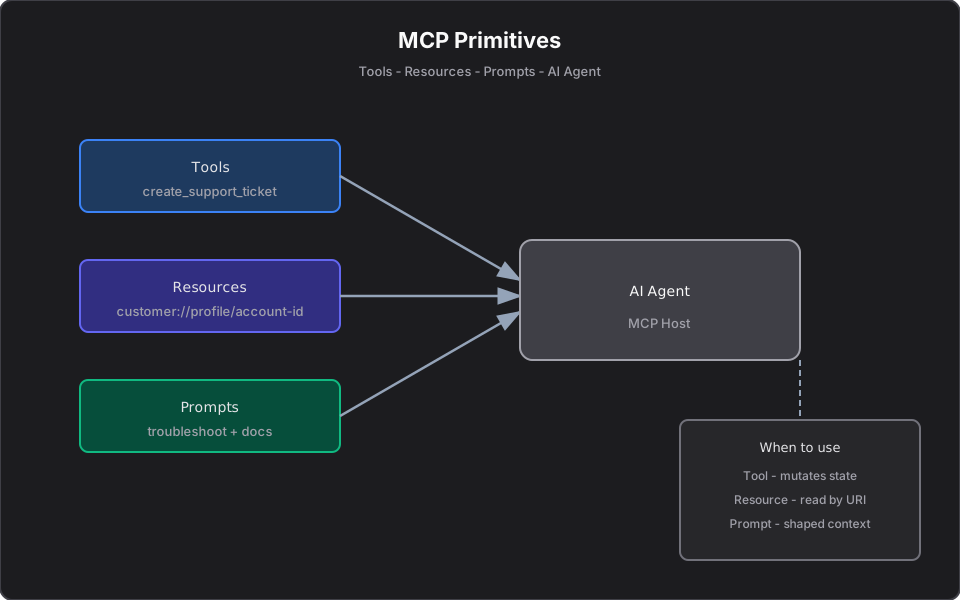
MCP primitives at a glance
| Primitive | Purpose | Enterprise example |
|---|---|---|
| Tool | Callable action with side effects or computation | Create support ticket, adjust inventory |
| Resource | Read-only data at a stable URI | `customer://profile/{id}` |
| Prompt | Curated multi-turn context for the LLM | Onboarding summary from CRM + docs |
Tools do things. Resources expose data. Prompts shape conversations.
Tool: Create a support ticket
Tools should return strings the LLM can present directly — including business-level failures.
[McpServerToolType]
public sealed class CreateSupportTicketTool(ITicketService tickets)
{
    [McpServerTool, Description(
        "Create a support ticket for a customer issue. Returns confirmation or a descriptive failure message.")]
    public async Task<string> CreateTicketAsync(
        [Description("Customer identifier, e.g. CUST-2048.")]
        string customerId,

        [Description("Issue category: Billing, Shipping, Product, or Account.")]
        string category,

        [Description("Short summary of the issue.")]
        string summary,

        [Description("Priority: Low, Medium, or High.")]
        string priority,

        CancellationToken ct = default)
    {
        if (string.IsNullOrWhiteSpace(summary))
            return "Ticket rejected: summary is required.";

        try
        {
            var ticket = await tickets.CreateAsync(
                customerId, category, summary, priority, ct);

            return $"Ticket created. Reference: {ticket.TicketId}. " +
                   $"Category: {category}, priority: {priority}. " +
                   $"Status: {ticket.Status}.";
        }
        catch (CustomerNotFoundException)
        {
            return $"Ticket rejected: no customer found with ID '{customerId}'.";
        }
        catch (RateLimitExceededException)
        {
            return "Ticket rejected: rate limit exceeded for this customer. Try again later.";
        }
    }
}
Design note: return descriptive strings instead of throwing to the protocol layer when the failure is expected business logic (unknown customer, validation errors). Reserve exceptions for truly exceptional cases.
Resource: Customer profile by ID
Resources address read-only data with a URI template. Hosts subscribe or fetch without pretending the operation is a mutating tool.
[McpServerResourceType]
public sealed class CustomerResourceHandler(ICustomerService customers)
{
    [McpServerResource("customer://profile/{customerId}")]
    [Description("Returns customer profile, tier, open tickets, and recent orders as JSON.")]
    public async Task<string> GetCustomerProfileAsync(
        [Description("Customer identifier.")]
        string customerId,

        CancellationToken ct = default)
    {
        var profile = await customers.GetProfileAsync(customerId, ct)
            ?? throw new InvalidOperationException(
                $"No customer found with ID '{customerId}'.");

        return JsonSerializer.Serialize(profile, new JsonSerializerOptions
        {
            WriteIndented = true
        });
    }
}
Example snapshot shape the resource might return:
{
  "customerId": "CUST-2048",
  "name": "Acme Corp",
  "tier": "Enterprise",
  "openTickets": 2,
  "recentOrders": [
    { "orderId": "ORD-9912", "sku": "WH-1000XM5", "status": "Shipped" }
  ],
  "asOf": "2026-06-16T09:30:00Z"
}
Use resources when the AI needs context without implying an action. Use tools when the AI should execute a bounded operation.
Prompt: Documentation-assisted troubleshooting
Prompts assemble system + user messages with live data injected — ideal for repeatable support and onboarding workflows.
[McpServerPromptType]
public sealed class TroubleshootingPrompt(
    ICustomerService customers,
    IDocumentationService docs)
{
    [McpServerPrompt, Description(
        "Builds a prompt asking the LLM to troubleshoot a customer issue using profile data and internal docs.")]
    public async Task<ChatMessage[]> TroubleshootAsync(
        [Description("Customer identifier.")]
        string customerId,

        [Description("Issue description from the user or agent.")]
        string issueDescription,

        CancellationToken ct = default)
    {
        var profile = await customers.GetProfileAsync(customerId, ct)
            ?? throw new InvalidOperationException(
                $"No customer found with ID '{customerId}'.");

        var relevantDocs = await docs.SearchAsync(issueDescription, limit: 5, ct);
        var docContext = string.Join("
---
",
            relevantDocs.Select(d => $"## {d.Title}
{d.Excerpt}"));

        return
        [
            new ChatMessage(ChatRole.System,
                "You are an internal support assistant. Use the customer profile and " +
                "documentation excerpts to suggest troubleshooting steps. Cite doc titles. " +
                "Do not invent product features not mentioned in the docs."),
            new ChatMessage(ChatRole.User,
                $"Customer profile:\n{JsonSerializer.Serialize(profile)}\n\n" +
                $"Issue:\n{issueDescription}\n\n" +
                $"Documentation:\n{docContext}")
        ];
    }
}
Prompts are not a substitute for human escalation — they standardize how context enters the model.
Choosing the right primitive
| Scenario | Use |
|---|---|
| Fetch profile for CUST-2048 | Resource `customer://profile/CUST-2048` |
| Create support ticket | Tool `create_support_ticket` + approval if needed |
| Draft troubleshooting steps | Prompt `troubleshoot` + doc search |
| Answer "what is our return policy?" | RAG over policy documentation |
Contract testing mindset
Treat MCP tools like public API endpoints:
- Snapshot the JSON Schema the server advertises
- Integration-test happy path and validation failures
- Verify error strings are safe to show end users (no stack traces, no PII from other tenants)
[Fact]
public async Task CreateTicket_Rejects_Empty_Summary()
{
    var tool = new CreateSupportTicketTool(new FakeTicketService());
    var result = await tool.CreateTicketAsync(
        "CUST-1", "Billing", "", "Medium");

    Assert.Contains("summary is required", result);
}
Common mistakes in enterprise MCP servers
- Exposing a raw SQL or generic REST proxy tool — too much power, hard to audit
- Using a tool for read-only customer data that should be a resource
- Returning stack traces to the LLM on validation errors
- Skipping idempotency keys on ticket or inventory tools (duplicate agent calls = duplicate side effects)
What I Learned Building MCP Servers
The teams I have seen succeed treat MCP primitives as API design, not AI novelty. Resources map cleanly to "GET by ID." Tools map to "POST with validation." Prompts map to "canned runbooks with live context."
The failure mode is blurring all three: a tool that returns read-only data, a resource that triggers side effects, or a prompt that tries to replace proper authorization. Pick the primitive that matches the operation semantics — your future auditors will thank you.
Next in this series
Deploying MCP Servers: Stdio, HTTP, and Approval Gates covers transport choice for Cursor vs production, plus human-in-the-loop gates before `create_support_ticket` and `adjust_inventory`.
References
- AI tool calling in .NET
- From AI Model Consumer to AI Application Builder
- Inspired by *Hands-On Model Context Protocol for C# and .NET Developers* (Chapter 2)
Related reading
Building Your First MCP Server in C# and .NET
Tutorial: expose product catalog search to AI hosts with the ModelContextProtocol NuGet package — compare manual HTTP integration vs MCP tools using enterprise domain models and Cursor setup.
Deploying MCP Servers: Stdio, HTTP, and Approval Gates
Platform engineering guide to MCP transport choice — stdio for Cursor, HTTP for production containers — plus human-in-the-loop approval before state-changing tools.
From AI Model Consumer to AI Application Builder
A practical guide for .NET engineers moving from chat prompts to RAG, MCP servers, agents, and agentic workflows — with security patterns, architecture diagrams, and platform mental models.