Deploying MCP Servers: Stdio, HTTP, and Approval Gates
Summary
Platform engineering guide to MCP transport choice — stdio for Cursor, HTTP for production containers — plus human-in-the-loop approval before state-changing tools.
Once your MCP tools compile locally, the next decision is how agents connect: subprocess stdio for IDE development, HTTP for containers and shared platform services, and approval gates before high-stakes operations.
This article follows Chapter 3 (transport) and Chapter 8 (guardrails) from Hands-On MCP for C# and .NET, applied to platform engineering workflows — catalog search, ticket creation, and inventory adjustments.
Prerequisites: Building Your First MCP Server in C# and .NET and MCP Tools, Resources, and Prompts Explained.
One tool implementation, two transports
Keep tool classes transport-agnostic. Register the same `SearchProductsTool` and `CreateSupportTicketTool` whether the host speaks stdio or HTTP.
[McpServerToolType]
public class PlatformTools(
    IProductCatalogService catalog,
    ITicketService tickets)
{
    [McpServerTool, Description("Search the product catalog by SKU or name.")]
    public Task<ProductSearchResult> SearchProductsAsync(
        string query, string? category, CancellationToken ct)
        => catalog.SearchAsync(query, category, ct);

    // CreateSupportTicketAsync ... (see prior article)
}
Transport is a host concern, not a business-logic concern.
Stdio: best for Cursor and local agents
Stdio launches the MCP server as a child process. The IDE writes JSON-RPC to stdin and reads from stdout.
var builder = Host.CreateApplicationBuilder(args);

builder.Services.AddSingleton<IProductCatalogService, MockProductCatalogService>();
builder.Services.AddSingleton<ITicketService, MockTicketService>();

builder.Services
    .AddMcpServer()
    .WithStdioServerTransport()
    .WithTools<PlatformTools>();

builder.Logging.AddConsole(o =>
    o.LogToStandardErrorThreshold = LogLevel.Trace);

await builder.Build().RunAsync();| Stdio pros | Stdio cons |
|---|---|
| Simple local dev | One client per process |
| Works with Cursor `mcp.json` | No remote sharing |
| No open port | Containers cannot share stdin easily |
Rule: never `Console.WriteLine` debug output to stdout — it corrupts the MCP stream. Log to stderr.
HTTP: best for Docker, platform teams, MCP Inspector
HTTP transport exposes MCP on a URL — required when multiple clients or containers need the same server.
var builder = WebApplication.CreateBuilder(args);
builder.WebHost.UseUrls("http://0.0.0.0:5001");

builder.Services.AddSingleton<IProductCatalogService, MockProductCatalogService>();
builder.Services.AddSingleton<ITicketService, MockTicketService>();

builder.Services.AddCors(o => o.AddDefaultPolicy(p =>
    p.AllowAnyOrigin().AllowAnyMethod().AllowAnyHeader()));

builder.Services
    .AddMcpServer()
    .WithHttpTransport(options => options.Stateless = true)
    .WithTools<PlatformTools>();

var app = builder.Build();
app.UseCors();
app.MapMcp();

app.Run();| HTTP pros | HTTP cons |
|---|---|
| Shared platform endpoint | Requires auth (JWT, mTLS) in production |
| Docker / Kubernetes friendly | Operational monitoring needed |
| MCP Inspector HTTP mode | CORS and TLS configuration |
For production platform workloads, pair HTTP MCP with Entra ID JWT, Key Vault secrets, and tenant isolation — the same patterns you'd use for any internal API.
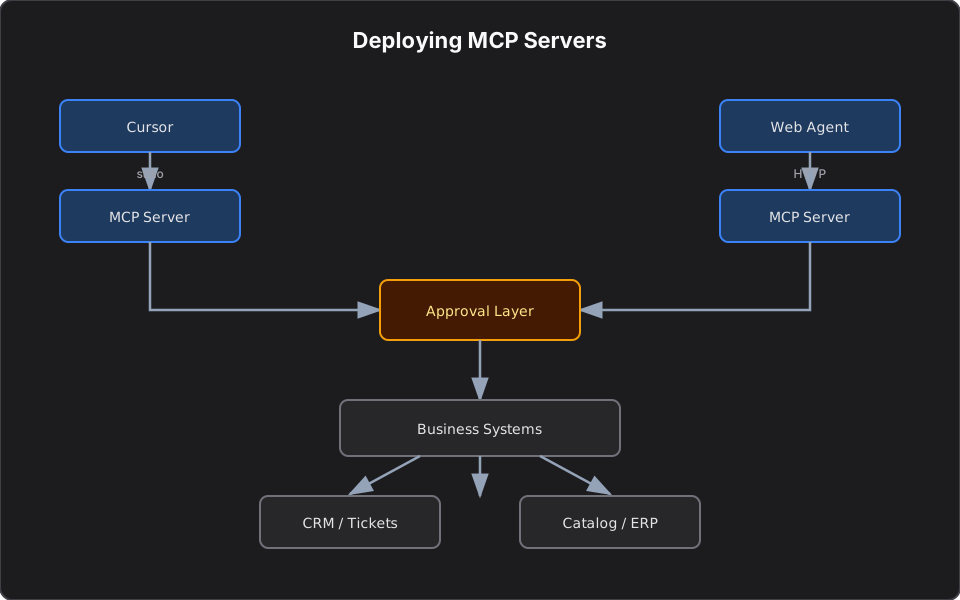
Transport decision flow
Many teams ship two entry points in one solution: `PlatformMcpServer.Stdio` for developers, `PlatformMcpServer.Http` for staging/production.
Approval gates before high-stakes tools
Not every tool deserves the same trust level. Treat create ticket, adjust inventory, and update customer record as high-stakes — pause for human confirmation.
public interface IApprovalProvider
{
    Task<bool> RequestApprovalAsync(
        string toolName,
        IReadOnlyDictionary<string, object?> args,
        CancellationToken ct = default);
}

public sealed class ApprovalGate(IApprovalProvider approvals) : IGuardrail
{
    private static readonly HashSet<string> HighStakes =
        ["create_support_ticket", "adjust_inventory", "update_customer_record"];

    public async Task<GuardrailResult> CheckAsync(
        string toolName,
        IReadOnlyDictionary<string, object?> args,
        CancellationToken ct = default)
    {
        if (!HighStakes.Contains(toolName))
            return GuardrailResult.Allow();

        var approved = await approvals.RequestApprovalAsync(toolName, args, ct);
        return approved
            ? GuardrailResult.Allow()
            : GuardrailResult.Reject("User denied the action.");
    }
}
Console provider for development:
public sealed class ConsoleApprovalProvider : IApprovalProvider
{
    public Task<bool> RequestApprovalAsync(
        string toolName,
        IReadOnlyDictionary<string, object?> args,
        CancellationToken ct = default)
    {
        Console.Error.WriteLine($"Approval required: {toolName}");
        Console.Error.WriteLine(JsonSerializer.Serialize(args));
        Console.Error.Write("Approve action? [y/N] ");
        var response = Console.ReadLine() ?? string.Empty;
        return Task.FromResult(
            response.Trim().Equals("y", StringComparison.OrdinalIgnoreCase));
    }
}
Use `AutoApprovalProvider` only in automated test pipelines, never in production.
Layered security for production MCP
| Layer | Control |
|---|---|
| Transport | TLS, JWT, private network |
| Tool design | Bounded operations, no generic SQL |
| Guardrails | Approval gate on writes |
| Data | Tenant isolation, PII redaction in logs |
| Audit | Log tool name, user, redacted args, timestamp |
Observability checklist
Before promoting an HTTP MCP server:
- Structured logs with correlation IDs per agent session
- Metrics: tool latency, error rate, approval denial rate
- Token/cost tracking if the agent loop calls an LLM repeatedly
- Budget caps for automated agents hitting paid third-party APIs
What I Learned Building MCP Servers
Stdio and HTTP are not an either/or forever — they serve different phases of the same product. I use stdio during tool design in Cursor, then promote the same tool classes to an HTTP host behind auth when other teams or CI agents need access.
Approval gates feel heavy until the first time an agent loops and fires a write tool twice. Build the gate before you need it, not after an incident.
Series recap
| Article | Focus |
|---|---|
| First MCP server | HTTP vs MCP, product catalog search |
| Tools, resources, prompts | Tickets, customer URI, troubleshooting prompt |
| This article | Stdio vs HTTP, approval gates |
For finance-specific MCP patterns (portfolio resources, order tools), see Building Finance MCP Servers.
References
- Deploy a .NET MCP server to Azure Container Apps
- MCP servers in NuGet packages
- From AI Model Consumer to AI Application Builder
- Inspired by *Hands-On Model Context Protocol for C# and .NET Developers* (Chapters 3 and 8)
Related reading
MCP Tools, Resources, and Prompts in C#: A Hands-On Tutorial
Hands-on C# patterns for enterprise MCP servers — support ticket tools, customer profile resource URIs, documentation prompts, and contract testing with platform-domain examples.
Building Your First MCP Server in C# and .NET
Tutorial: expose product catalog search to AI hosts with the ModelContextProtocol NuGet package — compare manual HTTP integration vs MCP tools using enterprise domain models and Cursor setup.
From AI Model Consumer to AI Application Builder
A practical guide for .NET engineers moving from chat prompts to RAG, MCP servers, agents, and agentic workflows — with security patterns, architecture diagrams, and platform mental models.