Building Finance MCP Servers
Summary
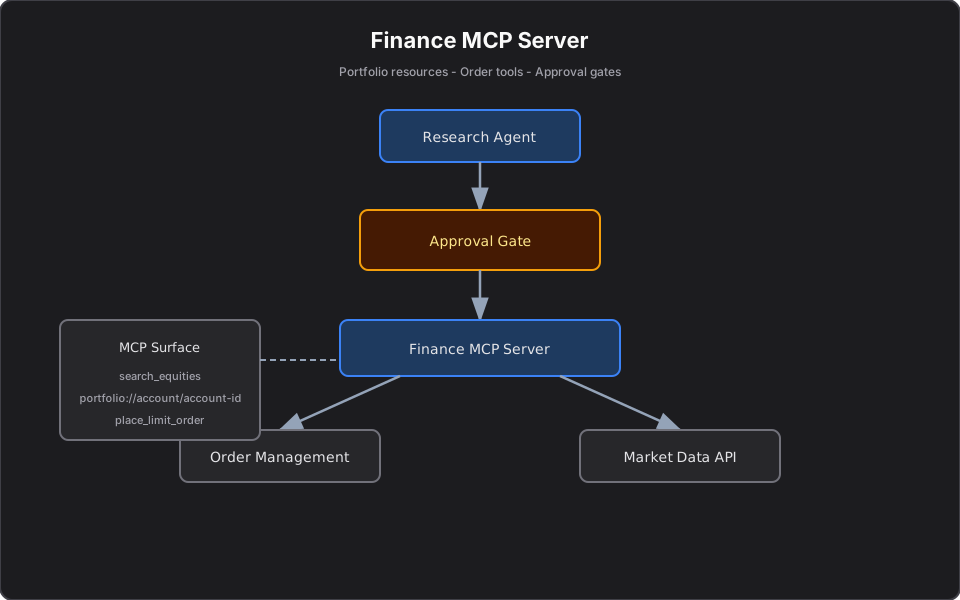
Finance-specific MCP patterns — equity search, portfolio resources, order tools with approval gates, and audit-friendly error handling for regulated workloads.
Most MCP tutorials use travel or e-commerce examples. Finance teams need different guardrails: tenant isolation, audit trails, and human approval before any action that moves money.
This article consolidates finance-specific MCP patterns — portfolio resources, order tools, and investor prompts — in one place. For the general .NET MCP tutorial series, start with Building Your First MCP Server in C# and .NET.
Why finance MCP is different
| Concern | Generic enterprise MCP | Finance MCP |
|---|---|---|
| Read tools | Low risk | Market data licensing, delayed quotes |
| Write tools | Approval optional | Approval mandatory |
| Resources | Customer profile | Portfolio holdings, PII + regulatory data |
| Errors | User-friendly strings | No cross-tenant leakage, no stack traces |
Tool: Search equities
Read-only market data is a safe first finance tool — same pattern as product catalog search, different domain models.
[McpServerToolType]
public sealed class SearchEquitiesTool(IMarketDataService marketData)
{
    [McpServerTool, Description(
        "Search listed equities by company name or ticker symbol, optionally filtered by sector.")]
    public async Task<StockSearchResult> SearchEquitiesAsync(
        [Description("Ticker or company name, e.g. AAPL or Apple.")]
        string query,

        [Description("Optional GICS sector filter, e.g. Financials or Technology.")]
        string? sector,

        CancellationToken ct = default)
    {
        return await marketData.SearchAsync(query, sector, ct);
    }
}
Tool: Place a limit order (with validation)
Finance write tools must return business-level failures as strings, not protocol exceptions.
[McpServerTool, Description("Place a limit order. Returns confirmation or rejection reason.")]
public async Task<string> PlaceLimitOrderAsync(
    string accountId, string symbol, string side,
    int quantity, decimal limitPrice, CancellationToken ct)
{
    if (quantity <= 0)
        return "Order rejected: quantity must be positive.";

    try
    {
        var confirmation = await orders.PlaceLimitAsync(
            accountId, symbol, side, quantity, limitPrice, ct);
        return $"Order accepted. Reference: {confirmation.OrderId}.";
    }
    catch (InsufficientBuyingPowerException ex)
    {
        return $"Order rejected: insufficient buying power. " +
               $"Required: {ex.RequiredAmount}, available: {ex.AvailableAmount}.";
    }
}
Pair this with an approval gate before execution — see Deploying MCP Servers.
Resource: Portfolio holdings
[McpServerResource("portfolio://account/{accountId}")]
[Description("Returns holdings, cash balance, and allocation weights as JSON.")]
public async Task<string> GetPortfolioAsync(string accountId, CancellationToken ct)
{
    var snapshot = await portfolio.GetSnapshotAsync(accountId, ct)
        ?? throw new InvalidOperationException($"No portfolio for '{accountId}'.");
    return JsonSerializer.Serialize(snapshot, new JsonSerializerOptions { WriteIndented = true });
}
Use resources for context. Never use a tool when the agent only needs to read holdings.
Prompt: Investor portfolio review
[McpServerPrompt, Description("Summarize a portfolio for an investor update.")]
public async Task<ChatMessage[]> PortfolioReviewAsync(string accountId, CancellationToken ct)
{
    var snapshot = await portfolio.GetSnapshotAsync(accountId, ct);
    return
    [
        new ChatMessage(ChatRole.System,
            "You are a fiduciary-aware assistant. Summarize allocation drift and " +
            "concentration risk in plain language. Do not recommend trades unless asked."),
        new ChatMessage(ChatRole.User, $"Portfolio:\n{JsonSerializer.Serialize(snapshot)}")
    ];
}
Finance MCP security stack
| Layer | Control |
|---|---|
| Transport | TLS, JWT, private VPC |
| Tools | Bounded ops — no generic SQL or REST proxy |
| Guardrails | Approval on `place_limit_order`, `cancel_order` |
| Audit | Tool name, user, redacted args, timestamp |
| Compliance | Prompts are not investment advice |
What I Learned Building MCP Servers
Finance MCP servers fail when teams treat them like chatbot plugins instead of regulated API surfaces. The teams that ship safely start with read-only market data, add portfolio resources second, and only then expose order tools behind approval gates and idempotency keys.
If you are building for a broader platform (catalog, tickets, docs), the enterprise MCP tutorial series covers the same primitives with domain-neutral examples.
References
Related reading
Building Your First MCP Server in C# and .NET
Tutorial: expose product catalog search to AI hosts with the ModelContextProtocol NuGet package — compare manual HTTP integration vs MCP tools using enterprise domain models and Cursor setup.
Deploying MCP Servers: Stdio, HTTP, and Approval Gates
Platform engineering guide to MCP transport choice — stdio for Cursor, HTTP for production containers — plus human-in-the-loop approval before state-changing tools.
From AI Model Consumer to AI Application Builder
A practical guide for .NET engineers moving from chat prompts to RAG, MCP servers, agents, and agentic workflows — with security patterns, architecture diagrams, and platform mental models.