Building Your First MCP Server in C# and .NET
Summary
Tutorial: expose product catalog search to AI hosts with the ModelContextProtocol NuGet package — compare manual HTTP integration vs MCP tools using enterprise domain models and Cursor setup.
This tutorial adapts the Hands-On MCP for C# and .NET progression to a domain most enterprise teams already own: product catalog search. If you already understand why MCP matters conceptually, see From AI Model Consumer to AI Application Builder first.
What you will build: the same business capability twice — once with a hand-rolled HTTP client, once with an MCP tool — and see why the second path scales better for AI-assisted development.
Domain models
Start with small, explicit types. These mirror how you'd model a catalog service behind a commerce or operations platform.
public record Product(
    string Sku,
    string Name,
    string Category,
    decimal UnitPrice,
    int AvailableQuantity,
    string WarehouseId);

public record ProductSearchResult(
    IReadOnlyList<Product> Products,
    int TotalResults);

public interface IProductCatalogService
{
    Task<ProductSearchResult> SearchAsync(
        string query,
        string? category,
        CancellationToken ct = default);
}
Approach 1: Without MCP (manual HTTP integration)
Before MCP, every consumer — Blazor UI, background job, LLM host — reimplements the same glue code.
public class CatalogHttpClient(HttpClient http)
{
    private const string ApiKeyHeader = "X-Api-Key";

    public async Task<IReadOnlyList<Product>> SearchAsync(
        string query,
        string? category,
        CancellationToken ct = default)
    {
        http.DefaultRequestHeaders.TryAddWithoutValidation(
            ApiKeyHeader,
            Environment.GetEnvironmentVariable("CATALOG_API_KEY") ?? string.Empty);

        var url = $"/v1/products/search?q={Uri.EscapeDataString(query)}";
        if (!string.IsNullOrEmpty(category))
            url += $"&category={Uri.EscapeDataString(category)}";

        var response = await http.GetFromJsonAsync<VendorApiResponse>(url, ct)
            ?? throw new InvalidOperationException("Catalog API returned no response.");

        return response.Items
            .Select(i => new Product(
                i.Sku, i.Name, i.Category,
                i.Price, i.Qty, i.Warehouse))
            .ToList();
    }
}

file record VendorApiResponse(List<VendorProduct> Items);
file record VendorProduct(
    string Sku, string Name, string Category,
    decimal Price, int Qty, string Warehouse);
Problems for AI workflows
- The LLM host must know URL shape, headers, and response mapping
- Each new tool consumer duplicates integration code
- No automatic JSON Schema for the model to reason about parameters
- Errors are inconsistent across services
| Aspect | Manual HTTP client |
|---|---|
| Boilerplate | High (URL, auth, mapping) |
| Schema for LLM | Manual / absent |
| New consumer cost | Duplicate adapter |
| Type safety | Client-side only |
Approach 2: With MCP (declarative tool)
With the official ModelContextProtocol NuGet package, you expose the same service as a self-describing tool.
using ModelContextProtocol.Server;
using System.ComponentModel;

[McpServerToolType]
public sealed class SearchProductsTool(IProductCatalogService catalog)
{
    [McpServerTool, Description(
        "Search the product catalog by SKU or product name, optionally filtered by category.")]
    public async Task<ProductSearchResult> SearchProductsAsync(
        [Description("SKU or product name, e.g. WH-1000XM5 or wireless headphones.")]
        string query,

        [Description("Optional category filter, e.g. Electronics or Home.")]
        string? category,

        CancellationToken ct = default)
    {
        return await catalog.SearchAsync(query, category, ct);
    }
}
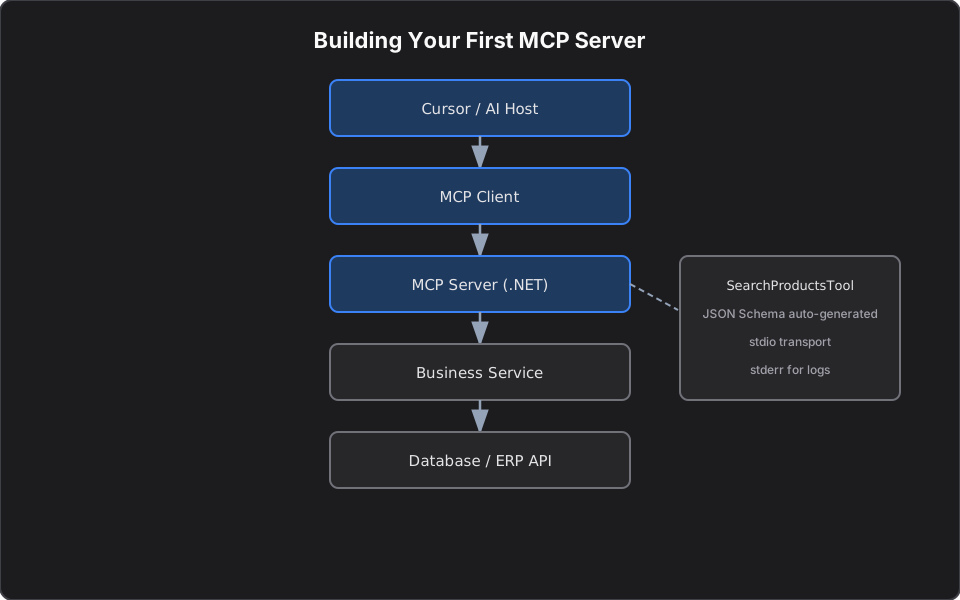
The SDK generates JSON Schema from your C# types and `[Description]` attributes at startup. Any MCP-compliant host (Cursor, Claude Desktop, custom agents) discovers the tool without a bespoke adapter.
| Aspect | MCP tool |
|---|---|
| Boilerplate | Attributes + business logic |
| Schema for LLM | Automatic |
| New consumer cost | Zero — standard protocol |
| Type safety | Full stack |
Side-by-side architecture
Same domain service. Different integration surface.
Register the server (minimal host)
For local development, register stdio transport so Cursor can launch the server as a subprocess:
var builder = Host.CreateApplicationBuilder(args);

builder.Services.AddSingleton<IProductCatalogService, MockProductCatalogService>();

builder.Services
    .AddMcpServer()
    .WithStdioServerTransport()
    .WithTools<SearchProductsTool>();

builder.Logging.AddConsole(o =>
    o.LogToStandardErrorThreshold = LogLevel.Trace);

await builder.Build().RunAsync();
Log to stderr so stdout stays clean for the MCP protocol stream.
Cursor configuration
Add the server to `.cursor/mcp.json`:
{
  "mcpServers": {
    "enterprise-catalog": {
      "command": "dotnet",
      "args": ["run", "--project", "src/CatalogMcpServer/CatalogMcpServer.csproj"],
      "env": {
        "CATALOG_API_KEY": "${env:CATALOG_API_KEY}"
      }
    }
  }
}
Restart MCP in Cursor settings, then try: *"Find wireless headphones under $200 with more than 10 units in stock."*
When to use which pattern
Stay on HTTP when you only have traditional REST consumers and no AI hosts.
Adopt MCP when:
- IDE agents need live catalog, inventory, or customer context
- You want one tool definition for multiple AI clients
- Platform teams publish shared capabilities like internal NuGet packages
What I Learned Building MCP Servers
While building MCP servers for platform engineering workflows, I found that most teams start by exposing too many capabilities. The most successful implementations begin with narrowly scoped tools, strong descriptions, and approval gates around any action that modifies state.
For catalog search specifically: a read-only `search_products` tool is an ideal first MCP surface. It gives agents real context without write risk. Teams that skip straight to "generic REST proxy" tools usually regret it — the model gets too much power, schemas become vague, and audit trails fall apart.
Start with one read tool. Ship it to Cursor. Watch how engineers actually phrase requests. Then add write tools with guardrails.
Next in this series
- MCP Tools, Resources, and Prompts Explained — support tickets, customer resources, documentation prompts
- Deploying MCP Servers: Stdio, HTTP, and Approval Gates — production transport and guardrails for state-changing tools
References
- Model Context Protocol — Microsoft Learn
- Build a minimal MCP server using C#
- Inspired by *Hands-On Model Context Protocol for C# and .NET Developers* (Chapter 1)
Related reading
MCP Tools, Resources, and Prompts in C#: A Hands-On Tutorial
Hands-on C# patterns for enterprise MCP servers — support ticket tools, customer profile resource URIs, documentation prompts, and contract testing with platform-domain examples.
From AI Model Consumer to AI Application Builder
A practical guide for .NET engineers moving from chat prompts to RAG, MCP servers, agents, and agentic workflows — with security patterns, architecture diagrams, and platform mental models.
Private RAG Systems Without External APIs
Mid-sized teams can build secure, self-hosted AI assistants with open-source models, vector stores, and RAG — without routing proprietary data through third-party APIs.