MCP Prompts Explained: When to Use Prompts vs Tools vs Resources
Summary
Understand MCP prompts, reusable AI workflow templates, and how they differ from tools and resources in Model Context Protocol servers.
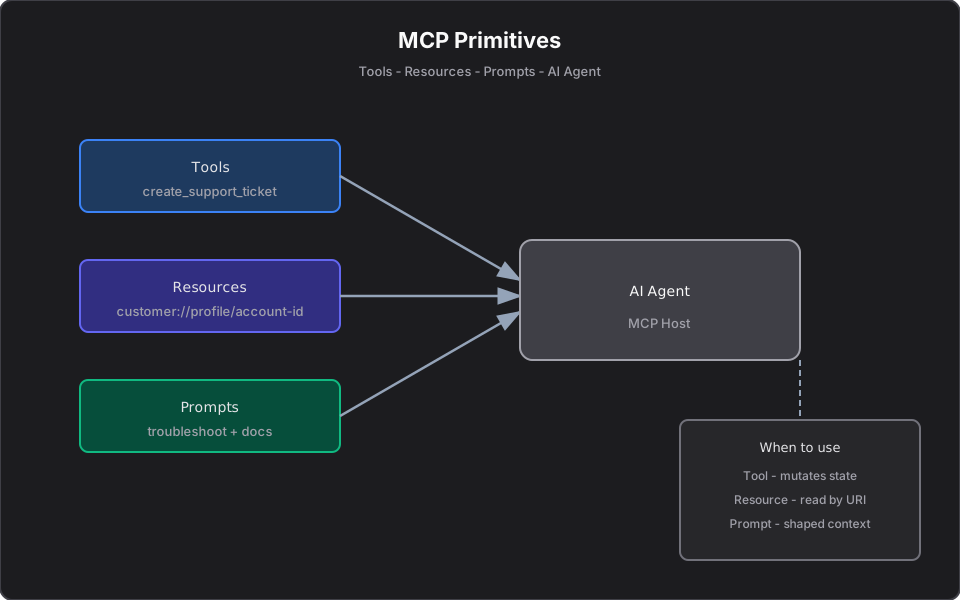
Short answer: An MCP prompt is a reusable, parameterized template that an AI client can invoke to assemble system and user messages — often injecting live data. Prompts standardize repeatable workflows: an incident summary, a portfolio review, a code-review checklist. A tool acts, a resource informs, and a prompt guides how the model should think about a task.
This article is part of a series. Start with Model Context Protocol Tools, Resources, and Prompts Explained, and see the official MCP documentation for the spec.
What are MCP prompts?
In Model Context Protocol, a prompt is a named, parameterized message template exposed by an MCP server. When a host invokes it with arguments, the server returns a ready-to-send sequence of chat messages — typically a system message defining the task and a user message carrying the relevant context.
Prompts as reusable workflow templates
Think of a prompt as a saved, parameterized "way of asking." Instead of every engineer free-typing "summarize this incident, include impact and next steps," the server ships an `incident_summary` prompt that always frames the request the same way, with the same guardrails, populated with the right data.
Why prompts matter in enterprise AI
- Consistency: every analyst gets the same structured output.
- Quality control: the system message encodes constraints (cite sources, no speculation, no PII).
- Speed: one click instead of re-typing context.
- Governance: prompt definitions live in version control, reviewed like code.
Prompts are not a security boundary — they shape context, they do not enforce permissions. Authorization still belongs in your tools and services.
Example: incident summary prompt
[McpServerPrompt, Description("Summarize a production incident with impact and next steps.")]
public async Task<ChatMessage[]> IncidentSummaryAsync(
    string serviceName, string incidentId, CancellationToken ct)
{
    var logs = await logService.GetIncidentAsync(serviceName, incidentId, ct);
    return
    [
        new ChatMessage(ChatRole.System,
            "You are an SRE assistant. Summarize the incident: impact, likely cause, " +
            "and concrete next steps. Cite log timestamps. Do not speculate beyond the data."),
        new ChatMessage(ChatRole.User, $"Incident data:\n{JsonSerializer.Serialize(logs)}")
    ];
}
Example: portfolio review prompt
A `portfolio_review` prompt injects holdings (often read from a resource) and asks for a plain-language summary highlighting allocation drift and concentration risk — without recommending specific trades unless asked. The finance build is covered in Building Finance MCP Servers.
Example: code review prompt
A `code_review` prompt frames a diff against your team's standards: async/await usage, structured logging, no secrets in code, and test coverage expectations. The model reviews against an explicit, versioned checklist rather than ad hoc preferences.
Prompts vs tools vs resources
| Primitive | Purpose | Example |
|---|---|---|
| Tool | Take an action / compute | `create_ticket`, `place_order` |
| Resource | Provide read-only context | `customer://profile/{id}` |
| Prompt | Shape a reusable request with live context | `incident_summary`, `portfolio_review` |
When to choose a prompt: the AI needs to perform a repeatable reasoning task the same way every time, using current data. If it just needs data, use a resource. If it needs to change something, use a tool.
Prompt design checklist
- Does the system message encode clear constraints and output format?
- Are arguments minimal and typed?
- Is live data injected from resources or read tools rather than hard-coded?
- Does it avoid implying authority it does not have (no "you may execute trades")?
- Is it versioned and reviewed like any other code artifact?
Common mistakes
- Using a prompt where a tool is needed — prompts cannot enforce actions or permissions.
- Stuffing huge, noisy context into the user message; scope it.
- Treating prompts as a compliance control. They standardize phrasing, not authorization.
- Hard-coding data that should be fetched fresh each invocation.
Final takeaway
Prompts turn tribal "how we ask the AI" knowledge into versioned, reusable templates. Combined with resources for context and tools for action, they let enterprise teams run consistent, governed AI workflows. Reach for a prompt when the task is repeatable and the framing matters as much as the data.
References
Frequently asked questions
- What is an MCP prompt?
- An MCP prompt is a reusable, parameterized message template exposed by an MCP server. When invoked, it returns ready-to-send chat messages, often with live data injected.
- What is the difference between MCP prompts, tools, and resources?
- A tool takes an action, a resource provides read-only context, and a prompt shapes a reusable request with live context. Use a prompt for repeatable reasoning tasks where framing matters.
- Are MCP prompts a security control?
- No. Prompts standardize how context enters the model but do not enforce permissions. Authorization belongs in your tools and underlying services.
Related reading
Model Context Protocol Tools, Resources, and Prompts Explained
Understand MCP tools, resources, and prompts with practical examples for AI agents, enterprise workflows, and developer productivity.
MCP Resources Explained with Practical Examples
Learn what MCP resources are, how they differ from tools, and how to use them for logs, portfolios, documents, APIs, and enterprise AI workflows.
Deploying MCP Servers: Stdio, HTTP, and Approval Gates
Platform engineering guide to MCP transport choice — stdio for Cursor, HTTP for production containers — plus human-in-the-loop approval before state-changing tools.