MCP Resources Explained with Practical Examples
Summary
Learn what MCP resources are, how they differ from tools, and how to use them for logs, portfolios, documents, APIs, and enterprise AI workflows.
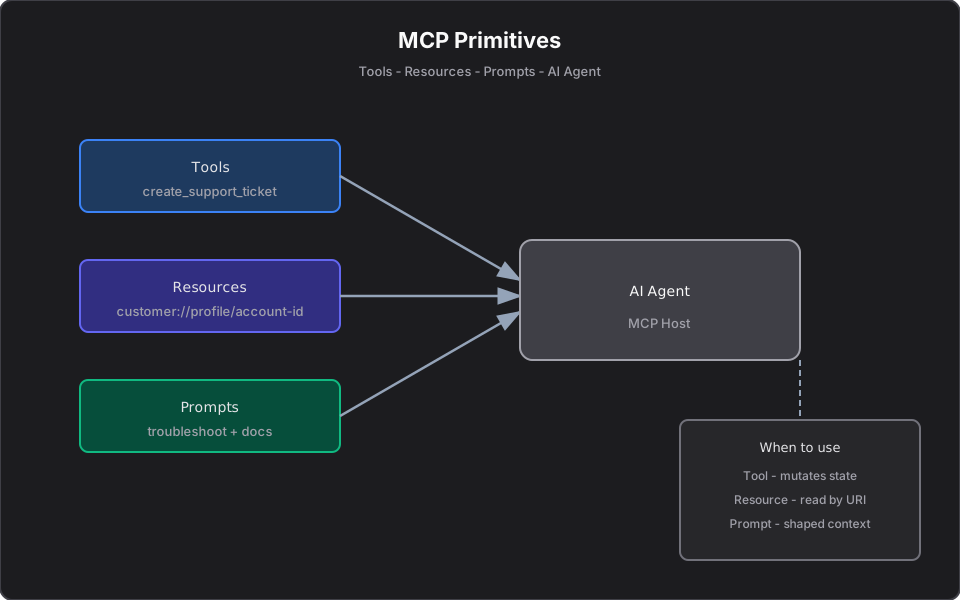
Short answer: An MCP resource is read-only data the model can fetch by URI. Resources give the AI context — a customer profile, a log file, a document, an API spec — without implying any action or side effect. If a tool is a POST, a resource is a GET.
This article is part of a series. For the overview, see Model Context Protocol Tools, Resources, and Prompts Explained. For the formal spec, see the official MCP documentation.
What are MCP resources?
In Model Context Protocol, a resource is a named, addressable piece of read-only data exposed by an MCP server. Each resource has a URI template — for example `customer://profile/{customerId}` — and returns structured content (usually JSON or text) when the host requests it.
Resources let the model know things about your systems. They are the context layer of MCP.
Resources are context, not actions
The single most important rule: resources do not change state. Fetching a resource should be safe to repeat, safe to cache, and free of side effects. If invoking something can create, modify, or delete data, it is a tool, not a resource. See MCP Prompts Explained for the third primitive.
Resource URI examples
| URI | Returns |
|---|---|
| `customer://profile/CUST-2048` | Customer profile, tier, open tickets |
| `portfolio://account/ACC-1024` | Holdings, cash balance, allocation weights |
| `logs://service/payments/2026-06-19` | A production log slice for one service/day |
| `docs://api/orders` | The OpenAPI description for the orders API |
Good use cases
- Customer or account profiles the model should reference.
- Portfolio or inventory snapshots.
- Documentation and API specs the model should ground answers in.
- Read-only log slices for investigation.
Bad use cases
- Anything that mutates state (use a tool).
- Unbounded data dumps — paginate or scope by ID and date.
- Cross-tenant data without isolation — never let one tenant's resource leak another's data.
Example: portfolio holdings resource
[McpServerResourceType]
public sealed class PortfolioResourceHandler(IPortfolioService portfolio)
{
    [McpServerResource("portfolio://account/{accountId}")]
    [Description("Returns holdings, cash balance, and allocation weights as JSON.")]
    public async Task<string> GetPortfolioAsync(string accountId, CancellationToken ct)
    {
        var snapshot = await portfolio.GetSnapshotAsync(accountId, ct)
            ?? throw new InvalidOperationException($"No portfolio for '{accountId}'.");
        return JsonSerializer.Serialize(snapshot, new JsonSerializerOptions { WriteIndented = true });
    }
}
A typical payload:
{
  "accountId": "ACC-1024",
  "cash": { "amount": 12500.00, "currencyCode": "USD" },
  "holdings": [
    { "symbol": "AAPL", "quantity": 40, "avgCost": 182.50, "weightPct": 18.2 }
  ],
  "asOf": "2026-06-19T09:30:00Z"
}
Example: production logs resource
`logs://service/{name}/{date}` returns a scoped, redacted slice of logs for one service and day. Scope and redaction matter: never expose raw, unbounded logs that may contain secrets or PII.
Example: API documentation resource
`docs://api/{name}` returns the OpenAPI spec or a curated summary so the model can reason about endpoints accurately instead of guessing. This pairs well with RAG over your wider docs — see Private RAG Systems Without External APIs.
Resources vs tools
| Aspect | Resource | Tool |
|---|---|---|
| Direction | Read | Read or write |
| Side effects | None | Allowed |
| Addressed by | URI | Name + arguments |
| Safe to repeat | Yes | Not always |
| Mental model | GET | POST |
A practical tip from designing real servers: when a client may not auto-fetch resources, also offer a read tool (e.g. `get_portfolio`) that returns the same payload. That redundancy is discussed in Can ChatGPT MCP Connectors Use Resources and Prompts or Only Tools?.
Design checklist
- Is the operation truly read-only and side-effect free?
- Is the URI template scoped by a stable identifier?
- Is the payload bounded and tenant-isolated?
- Are secrets and PII redacted?
- Is there a read-tool fallback for clients that do not auto-fetch resources?
Final takeaway
Resources are how you give an AI context safely. Keep them read-only, scoped by URI, bounded, and tenant-isolated — and reserve tools for anything that acts. Get that boundary right and your MCP server stays auditable and predictable.
References
Frequently asked questions
- What is an MCP resource?
- An MCP resource is read-only data exposed by an MCP server and addressed by a URI, such as customer://profile/CUST-2048. It gives the model context without any side effects.
- How is an MCP resource different from a tool?
- A resource is read-only and safe to repeat, like a GET request. A tool can change state and may have side effects, like a POST request.
- When should I add a read-tool fallback for a resource?
- When a client may not auto-fetch resources, expose a read tool that returns the same payload so the model can still reach the context it needs.
Related reading
Model Context Protocol Tools, Resources, and Prompts Explained
Understand MCP tools, resources, and prompts with practical examples for AI agents, enterprise workflows, and developer productivity.
MCP Prompts Explained: When to Use Prompts vs Tools vs Resources
Understand MCP prompts, reusable AI workflow templates, and how they differ from tools and resources in Model Context Protocol servers.
Building Your First MCP Server in C# and .NET
Tutorial: expose product catalog search to AI hosts with the ModelContextProtocol NuGet package — compare manual HTTP integration vs MCP tools using enterprise domain models and Cursor setup.