Model Context Protocol Tools, Resources, and Prompts Explained
Summary
Understand MCP tools, resources, and prompts with practical examples for AI agents, enterprise workflows, and developer productivity.
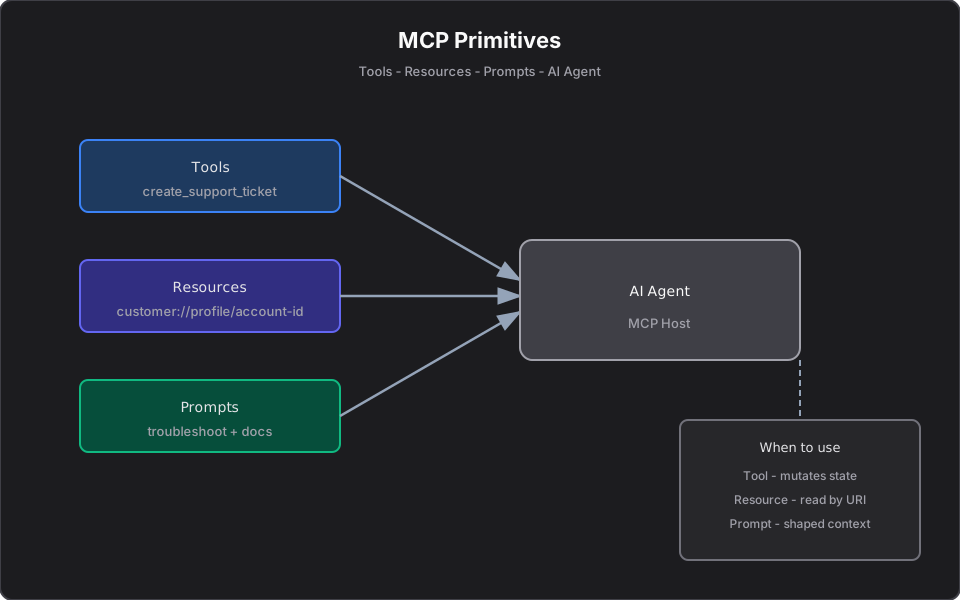
Short answer: Model Context Protocol (MCP) gives an AI client three building blocks. Tools let the model take actions, resources give it read-only context, and prompts package reusable instructions. Tools do, resources inform, prompts guide.
This is a conceptual overview. For a hands-on C# walkthrough, see MCP Tools, Resources, and Prompts in C#. For the formal spec, see the official MCP documentation and Model Context Protocol on Microsoft Learn.
What is Model Context Protocol?
Model Context Protocol is an open standard that defines how AI applications (the host, e.g. Cursor, Claude Desktop, or a custom agent) connect to external capabilities through an MCP server. Instead of every team inventing a bespoke integration for every model, MCP standardizes the contract — much like REST standardized how web clients talk to APIs.
An MCP server exposes its capabilities under three primitives:
| Primitive | Role | One-line definition |
|---|---|---|
| Tool | Action | A callable operation, often with side effects or computation |
| Resource | Context / data | Read-only data addressed by a stable URI |
| Prompt | Reusable instruction | A parameterized message template the host can invoke |
Why MCP matters for AI application builders
Without MCP, connecting a model to your systems means writing custom glue for each client: the URL shapes, the auth headers, the response mapping, and a hand-written description of every parameter. With MCP, you describe the capability once and any compliant host can discover and use it.
That shift — from "AI tool consumer" to "AI application builder" — is the theme of From AI Model Consumer to AI Application Builder. MCP is the protocol layer that makes it repeatable across teams.
MCP tools explained
A tool is an action the model can call. It has a name, a description, a typed input schema, and a return value. Tools are where state changes happen: create a ticket, place an order, trigger a deployment, run a query.
[McpServerTool, Description("Create a support ticket for a customer issue.")]
public async Task<string> CreateTicketAsync(
    [Description("Customer identifier, e.g. CUST-2048.")] string customerId,
    [Description("Short summary of the issue.")] string summary,
    CancellationToken ct = default)
{
    var ticket = await tickets.CreateAsync(customerId, summary, ct);
    return $"Ticket created. Reference: {ticket.TicketId}.";
}
The SDK turns the C# types and `[Description]` attributes into JSON Schema, so the model knows exactly what arguments the tool expects. Read more in MCP Resources Explained for how the read-only side differs.
MCP resources explained
A resource is read-only data the model can fetch by URI — no side effects implied. Think `customer://profile/CUST-2048` or `logs://service/payments/2026-06-19`. Resources give the model context without pretending a read is an action.
Use a resource when the AI only needs to know something. A deep dive with examples lives in MCP Resources Explained with Practical Examples.
MCP prompts explained
A prompt is a reusable, parameterized template that assembles system and user messages — often injecting live data. Prompts standardize repeatable workflows: an incident summary, a portfolio review, a code-review checklist.
Prompts are not a substitute for authorization or compliance review; they standardize how context enters the model. See MCP Prompts Explained for when to reach for a prompt versus a tool or resource.
Tools vs resources vs prompts
| Question | Use |
|---|---|
| Should the AI change state or compute something? | Tool |
| Does the AI just need to read data by ID? | Resource |
| Do you want a reusable, shaped instruction with live context? | Prompt |
| Should the AI answer from a body of documents? | RAG (retrieval), often alongside MCP |
A simple mnemonic: Tool = action. Resource = context/data. Prompt = reusable instruction/template.
Enterprise examples
- Support platform: `create_support_ticket` (tool), `customer://profile/{id}` (resource), `troubleshoot` (prompt that pulls profile + docs).
- Platform engineering: `investigate_log_file` (tool), `service://catalog/{name}` (resource), `incident_summary` (prompt).
- Commerce / operations: `search_products` (tool), `inventory://warehouse/{id}` (resource), `reorder_review` (prompt).
These map cleanly onto the work described on my projects page and the broader AI platform patterns I build day to day.
.NET / C# MCP examples
The official ModelContextProtocol NuGet package registers all three primitives in one host:
builder.Services
    .AddMcpServer()
    .WithStdioServerTransport()
    .WithTools<SupportTools>()
    .WithResources<CustomerResourceHandler>()
    .WithPrompts<TroubleshootingPrompt>();
For the full build — domain models, transports, and Cursor configuration — follow Building Your First MCP Server in C# and .NET.
Common mistakes
- Exposing a generic SQL or REST proxy tool — too much power, impossible to audit.
- Modeling read-only data as a tool when it should be a resource.
- Returning stack traces to the model on validation errors.
- Treating prompts as a security boundary — they shape context, they do not enforce permissions.
- Skipping idempotency keys on write tools, so a retrying agent double-submits.
When to use each primitive
Start read-only. Ship a resource or a read tool first, watch how engineers actually phrase requests, then add write tools behind validation and human approval. High-stakes actions (place order, deploy, wire transfer) belong behind an approval gate — covered in Deploying MCP Servers: Stdio, HTTP, and Approval Gates.
Final takeaway
MCP succeeds when you treat its primitives as API design, not AI novelty. Resources are your GETs, tools are your POSTs with validation, prompts are your canned runbooks. Pick the primitive that matches the operation's semantics and your servers stay safe, testable, and reusable across every AI client.
References and further reading
Frequently asked questions
- What are the three MCP primitives?
- Model Context Protocol defines tools (callable actions, often with side effects), resources (read-only data addressed by a URI), and prompts (reusable, parameterized message templates).
- What is the difference between an MCP tool and a resource?
- A tool takes an action or computes a result and may change state, like a POST request. A resource is read-only context fetched by URI with no side effects, like a GET request.
- When should I use an MCP prompt?
- Use a prompt when the AI needs to perform a repeatable reasoning task the same way every time using live data, such as an incident summary or portfolio review. Prompts shape context; they do not enforce permissions.
Related reading
MCP Resources Explained with Practical Examples
Learn what MCP resources are, how they differ from tools, and how to use them for logs, portfolios, documents, APIs, and enterprise AI workflows.
MCP Prompts Explained: When to Use Prompts vs Tools vs Resources
Understand MCP prompts, reusable AI workflow templates, and how they differ from tools and resources in Model Context Protocol servers.
Can ChatGPT MCP Connectors Use Resources and Prompts or Only Tools?
A practical explanation of what MCP connectors expose to AI clients: tools, resources, prompts, and how to think about capability support.