Can ChatGPT MCP Connectors Use Resources and Prompts or Only Tools?
Summary
A practical explanation of what MCP connectors expose to AI clients: tools, resources, prompts, and how to think about capability support.
Short answer: The Model Context Protocol itself supports tools, resources, and prompts. Individual clients — including ChatGPT connectors — may choose which of those capabilities they expose in their UI or runtime. So the right question is not "does MCP support resources and prompts?" (it does) but "does the specific client I am targeting surface them?"
To stay accurate: I will not claim exact current ChatGPT product behavior, because client capabilities change frequently. Instead, this article explains how to reason about capability support and design servers that degrade gracefully. Verify the latest behavior in the official MCP documentation and your client's own docs.
MCP supports tools, resources, and prompts
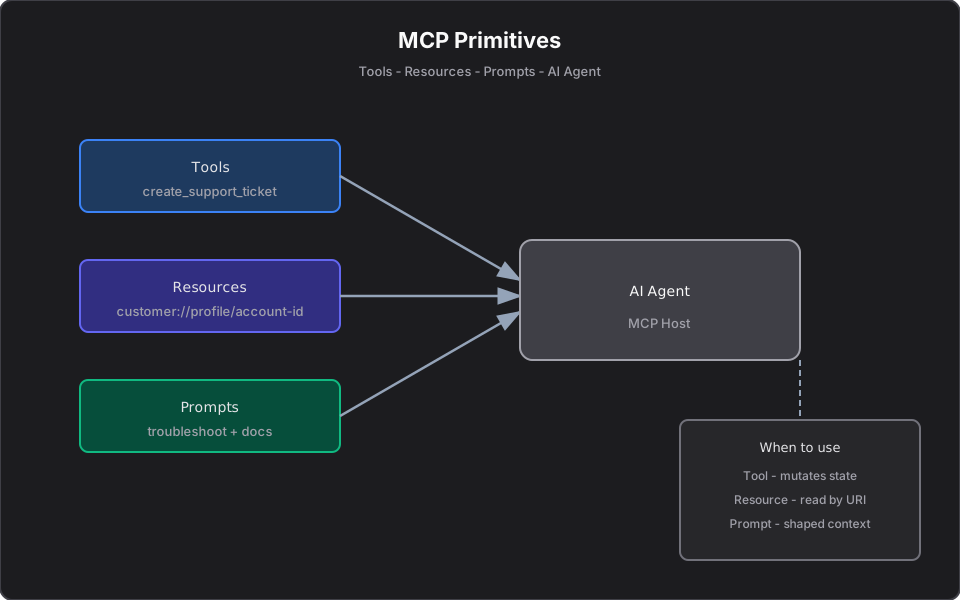
At the protocol level, an MCP server can advertise all three primitives:
| Primitive | What it provides |
|---|---|
| Tools | Callable actions with typed inputs and side effects |
| Resources | Read-only data addressed by URI |
| Prompts | Reusable, parameterized message templates |
If you are new to these, start with Model Context Protocol Tools, Resources, and Prompts Explained.
Actual client support may vary
A server advertising a capability and a client using it are two different things. Each host decides:
- Whether it reads resources automatically, on demand, or not at all.
- Whether it surfaces server-defined prompts in its UI.
- How it presents tools for the model to call.
The protocol is the contract; the client is the consumer. Treat client capability as a runtime fact to verify, not a constant.
Why tools are usually the first feature people notice
Tools are the most visible primitive because they do something — and "the AI took an action" is an obvious, demonstrable win. Resources and prompts are quieter: they shape context and standardize workflows, so they often land later in a client's roadmap and in users' mental models. That is why many people assume "MCP = tools," even though the spec is broader.
How to design MCP servers when client support differs
Design for graceful degradation:
- Lead with tools for the action a user clearly wants, since tool support is the most universal.
- Expose resources for context, but do not assume every client auto-fetches them. Where it matters, also offer a read tool (e.g. `get_customer_profile`) that returns the same data, so context is reachable even when resource support is absent.
- Offer prompts as a convenience layer, but make the underlying tools and resources usable without them.
This way a minimal client still gets value from tools, while a richer client benefits from resources and prompts.
Recommended enterprise pattern
The same server serves all three tiers. You implement business logic once; clients consume what they support.
Example: production triage MCP server
- Tool: `investigate_log_file(path)` — runs an analysis pipeline and returns findings.
- Read tool / resource: `service://catalog/{name}` resource, plus a `get_service_info(name)` tool fallback.
- Prompt: `incident_summary` — assembles logs, service ownership, and a runbook excerpt into a structured summary request.
A tools-only client still triages via `investigate_log_file` and `get_service_info`. A richer client gets the one-click `incident_summary` prompt.
Example: portfolio review MCP server
- Tool: `search_equities(query, sector)` — read-only market data.
- Resource: `portfolio://account/{id}` with a `get_portfolio(id)` tool fallback.
- Prompt: `portfolio_review` — injects holdings and asks for a plain-language summary.
For the finance-specific build, see Building Finance MCP Servers.
Checklist for MCP connector design
- Does each capability work standalone, without relying on another being supported?
- Is there a read tool fallback for any resource your workflow depends on?
- Are write tools bounded, validated, and gated for high-stakes actions? See Deploying MCP Servers.
- Are tool descriptions clear enough for the model to choose correctly?
- Have you verified capability support against the target client's current docs?
Final takeaway
MCP is a three-primitive protocol: tools, resources, and prompts. Whether a given connector exposes all three is a client decision that can change over time. Build servers that lead with tools, provide read fallbacks for resources, and treat prompts as an enhancement — and your integration works across the whole spectrum of clients.
References
Frequently asked questions
- Can MCP connectors use resources and prompts, or only tools?
- The Model Context Protocol supports tools, resources, and prompts. Individual clients may choose which capabilities they expose in their UI or runtime, so verify support against your target client's current documentation.
- Why do people think MCP is only about tools?
- Tools are the most visible primitive because they take actions. Resources and prompts shape context more quietly, so they are often noticed later, leading to the assumption that MCP equals tools.
- How should I design a server if client support varies?
- Lead with tools, provide a read-tool fallback for any resource your workflow depends on, and treat prompts as an enhancement. The same server then works for minimal and richer clients alike.
Related reading
Model Context Protocol Tools, Resources, and Prompts Explained
Understand MCP tools, resources, and prompts with practical examples for AI agents, enterprise workflows, and developer productivity.
MCP Resources Explained with Practical Examples
Learn what MCP resources are, how they differ from tools, and how to use them for logs, portfolios, documents, APIs, and enterprise AI workflows.
MCP Prompts Explained: When to Use Prompts vs Tools vs Resources
Understand MCP prompts, reusable AI workflow templates, and how they differ from tools and resources in Model Context Protocol servers.