AI-DLC Is Just Structured Prompts — What I Learned Trying AWS Labs aidlc-workflows
Summary
AI-DLC is structured prompts in .cursor/rules — but audit.md and aidlc-state.md are the real wins. A credible AI strategy for teams that do not want to build MCP servers, custom agents, or workflow orchestration from scratch.
I spent time working through AI-DLC Workflows from AWS Labs in Cursor on a real project. The uncomfortable truth upfront: this is nothing but structured prompts. Markdown files that tell your agent to slow down, ask questions, write a plan, and wait for a human to say yes.
That is the whole product. No new model. No proprietary runtime. No magic inference layer. Just rules in `.cursor/rules` and detail files in `.aidlc-rule-details/` that turn chaotic "build me an app" energy into something closer to a real SDLC.
If that sounds underwhelming, good. You should not adopt AI-DLC because AWS gave it a glossy acronym. You should adopt it if you keep losing context, skipping design, and shipping whatever the model hallucinated on the first pass.
What I actually tried
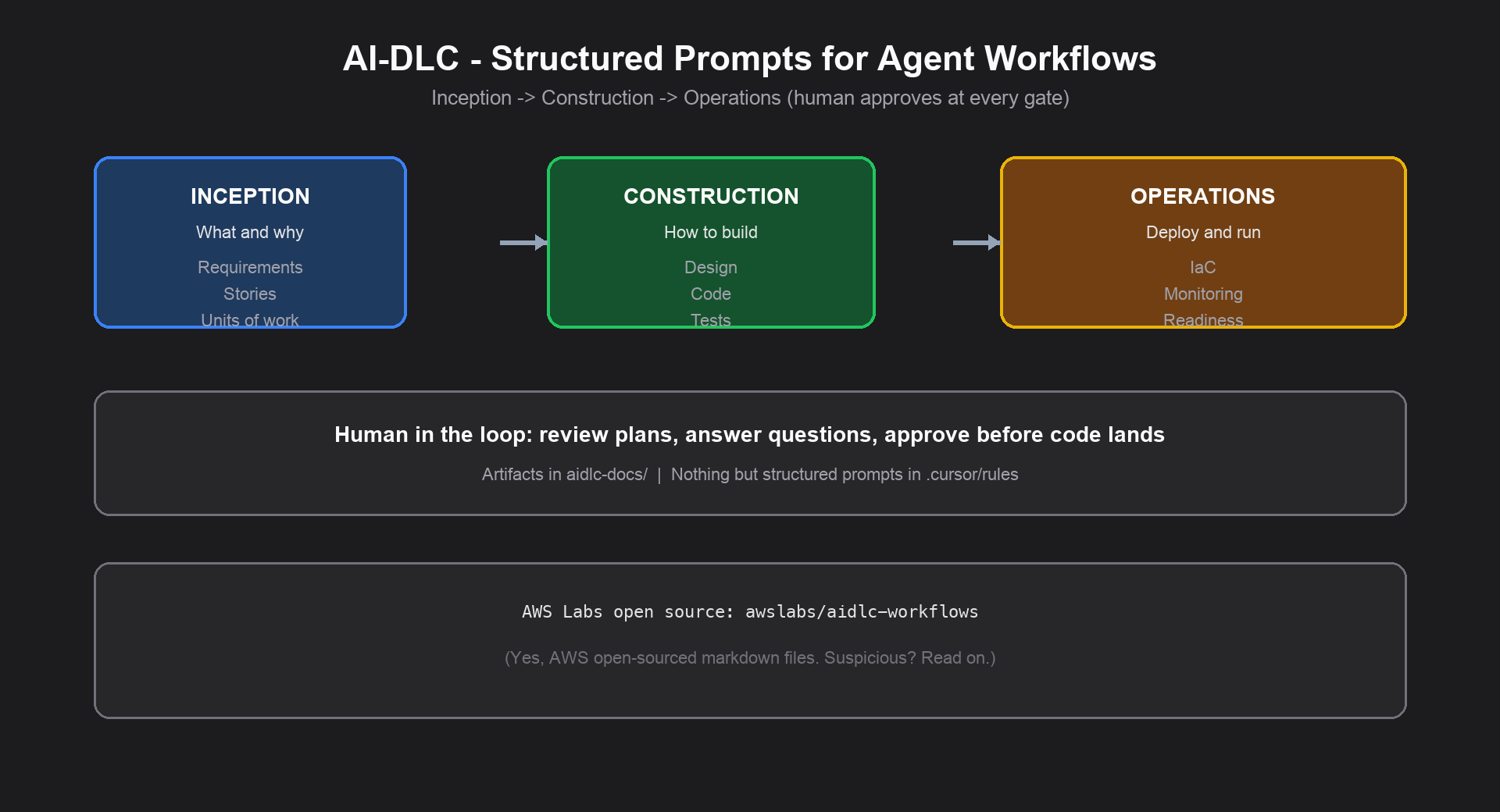
AI-DLC stands for AI-Driven Development Life Cycle. AWS Labs ships it as an open-source repo — awslabs/aidlc-workflows — with adaptive workflow steering rules for AI coding agents.
Here's what the workflow looks like in practice:
- Download the latest rules zip from Releases
- Drop them into a real project (not a toy hello-world repo)
- Start every prompt with `Using AI-DLC, ...`
- Let the agent propose an execution plan, write questions to files, and wait until you approve the next stage
The moment it clicked for me was not when the agent wrote code. It was when `aidlc-docs/` started filling up with requirements and design artifacts I could actually review — offline, in git, without scrolling three miles of chat.
Strip away the branding: it is structured prompts
Let me say it again because the marketing will try to confuse you.
AI-DLC is structured prompt engineering packaged as a methodology. The "adaptive workflow" is conditional logic in markdown: if the change is trivial, skip the ceremony; if it is complex, run more inception stages. The "human-in-the-loop tenet" is literally "do not proceed until the human approves." The "persistent artifacts" are files on disk.
That is not an insult. It is the useful part.
Most teams already know they should ask the agent to plan first. They just do not enforce it. AI-DLC enforces it by loading rules that the agent treats as always-on instructions. Same idea as a good Cursor rule, a Claude Code `CLAUDE.md`, or a Copilot instructions file — just more complete and opinionated about SDLC stages.
You: Using AI-DLC, add customer search with pagination
Agent: Here is my execution plan. I will run these inception stages...
Agent: I wrote clarifying questions to aidlc-docs/inception/questions.md
You: Approve stage 1
Agent: Now I implement
If you already write excellent prompts and your team actually reads each other's artifacts, you might not need the repo. For everyone else — which is most teams I work with — having the structure pre-built saves a month of arguing about process.
The three phases (what the prompts walk you through)
Inception — what and why
- Requirements analysis and validation
- User stories when applicable
- Application design and units of work
- Risk and complexity assessment
This is where the agent asks structured multiple-choice questions — often written to markdown files instead of buried in chat scrollback. Reading those files before approving the next stage is where the value shows up.
Construction — how to build
- Component and detailed design
- Code generation and implementation
- Build configuration and testing strategy
- Quality validation before moving forward
This connects to how I think about platform work more broadly — MCP servers give agents tools; agentic workflows give them orchestration. AI-DLC gives them discipline. All three matter; none replaces the others.
Operations — deploy and run
- Deployment automation and infrastructure
- Monitoring and observability
- Production readiness validation
Most teams I know are not ready to let an agent own this phase on day one. Treat operations as optional until your construction loop is trustworthy.
What problems it actually solved for me
| What kept going wrong before | What changed with AI-DLC |
|---|---|
| Prompt-and-pray, accept first draft | Explicit stages with approval gates |
| Context lost between agent conversations | Artifacts in `aidlc-docs/` committed to the repo |
| Agent over-engineered a one-line fix | Adaptive rules skip unnecessary stages |
| Agent under-engineered a risky change | More inception depth when complexity is high |
| No paper trail from idea to code | Traceable docs per stage |
| Ad-hoc prompting with no shared process | Repeatable script: same phases, same gates |
The biggest win for me was traceability. When I come back to a project a week later — or hand it to another engineer — the `aidlc-docs/` folder tells the story of what was decided and why.
Two files inside that folder do more work than everything else combined.
The two files I actually love: `audit.md` and `aidlc-state.md`
Most of AI-DLC's value lives in `aidlc-docs/`. Requirements, design docs, test plans — all useful. But the two files I keep coming back to are `audit.md` and `aidlc-state.md`.
`audit.md` — the audit file
This is an append-only audit trail. Every user input, every AI response, every approval — logged with ISO 8601 timestamps. The rules are explicit: never overwrite it, never summarize it, always append.
That sounds bureaucratic until you need it. Then it is the only thing that matters.
- "What did the agent decide?" — read the audit file
- "Who approved moving to construction?" — read the audit file
- "When did we change scope?" — read the audit file
I have built custom logging for agent workflows before. Having it built into the methodology — not bolted on afterward — is one of the nicest features in the whole repo. You get a permanent record without writing a line of instrumentation code. For teams that care about traceability (or just want to debug why the agent went sideways last Thursday), this alone is worth the setup.
`aidlc-state.md` — the state file
This is the workflow state tracker. Project info, which inception/construction stages completed or skipped, what is in progress, extension configuration — all in one place.
The resume story is what sold me. Close Cursor on Friday. Open it Monday. Instead of re-explaining the entire project in chat, point the agent at the state file:
Go to aidlc-docs/aidlc-state.md, find the first unchecked item,
then go to the corresponding plan file and resume from that point.
That is the recommended recovery pattern in the official docs, and it works because the state file is the source of truth — not your memory, not the chat history.
Together, audit file + state file turn a loose agent conversation into something that behaves like a real process: you always know where you are, and you always know what happened.
aidlc-docs/
├── aidlc-state.md    # Where am I in the workflow?
├── audit.md          # What happened, when, and who approved it?
├── inception/        # Requirements, stories, design
└── construction/     # Per-unit design and implementation artifacts
An AI strategy without inventing anything
Here is the angle I think a lot of companies are quietly looking for — even if they will not say it out loud.
Not every team wants to — or should — dive into building MCP servers, designing custom agents, or wiring agentic RAG workflows. That work is real. It is also a full platform engineering commitment. Most organizations are not there yet. Many never need to be.
AI-DLC lets a less experienced team — or a company that simply does not want the complexity — adopt a credible "AI strategy" without inventing anything:
- No custom agent framework to design
- No MCP server to build and secure
- No workflow orchestration layer to maintain
- No six-month "AI transformation" roadmap before the first guarded prompt
Download the rules zip. Drop it into Cursor. Start with `Using AI-DLC, ...`. Suddenly leadership has something tangible: a named methodology, stage gates, readable artifacts, an audit trail, a state file that proves work is tracked. Slide deck writes itself.
You are not pioneering agentic architecture. You are renting AWS's structured prompts and calling it your process. I mean that as a compliment. Most companies should not be inventing AI delivery frameworks — they should be shipping software with guardrails.
The teams I see struggle most are rarely failing because they lack a sophisticated MCP pipeline. They struggle because they have no process at all — random ChatGPT tabs, inconsistent prompting, no artifacts, no audit trail, no way to onboard the next engineer. AI-DLC is a minimum viable AI strategy for that group. Copy-paste discipline from a reputable open-source repo and move on.
Does that cap your ceiling? Yes, eventually. If you grow into serious agent platforms, you will outgrow markdown rules. But for the company that needs to look like it has an AI strategy this quarter — without standing up an Efficiency Team or hiring agent specialists — this is the pragmatic path. Invent later if you need to. Borrow now if you do not.
What it cannot solve
Worth being blunt about limits upfront, because overselling this stuff wastes everyone's time.
AI-DLC cannot
- Replace product judgment — someone still decides what is worth building
- Eliminate code review — the model will confidently write wrong code
- Guarantee good architecture — it proposes; your architects approve or reject
- Fix politics — if leadership cannot align on priorities, structured questions just delay the fight
- Make compliance disappear — auditors do not care that your prompt was well structured
- Turn bad requirements into good ones — garbage in, elaborately formatted garbage out
- Standardize every model — Claude, GPT, and whatever ships next week interpret rules differently
Generative AI makes mistakes. AI-DLC adds guardrails. It does not add infallibility. Review the output like you would review a strong junior engineer — fast, but not blindly.
So why did AWS open-source this?
Here is where I get a little sarcastic, because the branding deserves it.
AWS is not famous for showering the industry with free methodology out of pure altruism. When AWS Labs puts something on GitHub, my first question is always: what invoice does this eventually route to?
AI-DLC is markdown. Structured prompts. Files you copy into `.cursor/rules`. There is no meter running on the repo itself. Which is smart — give away the steering wheel so teams adopt the workflow, then let the AWS blog posts and conference talks gently remind you that the *real* AI-powered SDLC runs beautifully on Bedrock, Amazon Q, and a healthy side of managed services.
They are not hiding it. Read the AWS DevOps blog post. Count how quickly "agent-agnostic" becomes "here is how this fits your AWS toolchain."
That is the play. Open source the prompts. Own the narrative. Increase cloud consumption. I am not saying the rules are bad — I found them genuinely useful when I tried them. I am saying do not confuse "open source" with "no vendor agenda." AWS does not do random OSS projects. Even when the artifact is literally a zip of markdown files, there is a funnel.
My advice: take the rules, ignore the funnel. Use Cursor with Anthropic direct if that is what works. Run your agents on whatever model is best for the task. Let AI-DLC be the process layer, not the procurement layer.
How to use it in Cursor
Setup from the aidlc-workflows README:
mkdir -p .cursor/rules .aidlc-rule-details
cat > .cursor/rules/ai-dlc-workflow.mdc << 'EOF'
---
description: "AI-DLC adaptive workflow for software development"
alwaysApply: true
---
EOF
cat ~/Downloads/aidlc-rules/aws-aidlc-rules/core-workflow.md >> .cursor/rules/ai-dlc-workflow.mdc
cp -R ~/Downloads/aidlc-rules/aws-aidlc-rule-details/* .aidlc-rule-details/
Check Cursor Settings → Rules for `ai-dlc-workflow` under Project Rules.
Start prompts with:
Using AI-DLC, ...Examples that worked well for me:
- `Using AI-DLC, add a REST endpoint for customer search with pagination`
- `Using AI-DLC, analyze this codebase and propose a refactor plan`
- `Using AI-DLC, design a microservice for payment notifications`
Expect an execution plan, question files, stage approvals, and artifacts landing in `aidlc-docs/`. Commit that folder. The methodology only works if context survives your next coding session.
Optional extensions under `.aidlc-rule-details/extensions/` add security, property-based testing, or resiliency baselines. Treat them as starting points — customize before you trust them in production.
AI-DLC vs "just use AI"
| Approach | What it really is | When I use it |
|---|---|---|
| AI-assisted | Copilot-style help on individual tasks | Daily coding |
| One-shot autonomous | "Build the whole app" with no structure | Demos only |
| AI-DLC | Structured prompts + human gates + artifacts | Anything I might need to explain to another engineer later |
I still use AI-assisted mode inside construction. AI-DLC wraps it in a process I can defend in a design review.
Practical lessons from trying it
- Use a real repo — brownfield analysis is where adaptive rules earn their keep
- You are the approver — the workflow stalls if you skip stage gates or rubber-stamp everything
- Trust the audit and state files — `audit.md` for what happened, `aidlc-state.md` for where to resume
- Read the question files — the value is in `aidlc-docs/`, not the chat transcript
- Say "Using AI-DLC" every time — mixed prompts fight other rules in the project
- Time-box inception — requirements can expand forever if you let them
- Keep your CI — AI-DLC writes code; your pipeline proves it works
Where this fits in how I think teams should operate
AI-DLC is a delivery ritual for agents, not an org chart. It pairs well with the model I wrote about in How Software Engineering Teams Should Look in the AI Era: an Efficiency Team builds shared MCP and workflow infrastructure; execution squads ship features; AI-DLC keeps agent work from turning into unreviewed chaos.
Structured prompts at the agent level. Shared platform at the team level. Human judgment at both.
If you want to try it Monday
- Grab the latest release
- Install rules for your agent (Cursor, Copilot, Claude Code — they all work)
- Open a real project: `Using AI-DLC, analyze this project`
- Read the execution plan before you approve anything
- Commit `aidlc-docs/` with your code
- Add one custom rule for your org's standards
- Watch whether onboarding gets easier — that is the metric I care about
---
Related reading
- How Software Engineering Teams Should Look in the AI Era
- From AI Model Consumer to AI Application Builder
- Deploying MCP Servers: Stdio, HTTP, and Approval Gates
- Model Context Protocol Tools, Resources, and Prompts Explained
External resources
Frequently asked questions
- What is AI-DLC really?
- At its core, AI-DLC is structured prompts — markdown rules in .cursor/rules and .aidlc-rule-details/ that tell AI coding agents to plan, ask questions, wait for human approval, and write artifacts to aidlc-docs/. It is not a model or runtime.
- What are audit.md and aidlc-state.md in AI-DLC?
- audit.md is an append-only log of every user input, AI response, and approval with timestamps. aidlc-state.md tracks workflow progress — which stages completed, skipped, or are in progress — so you can resume without re-explaining the project in chat.
- What problems does AI-DLC not solve?
- AI-DLC does not replace product ownership, eliminate code review, guarantee correct architecture, fix organizational politics, or remove compliance burden. It adds process and traceability — not infallibility.
Related reading
How Software Engineering Teams Should Look in the AI Era
The traditional model repeats the same roles across siloed domain teams. The AI-era model connects specialized squads through an Efficiency Team building shared MCPs, RAG pipelines, agents, and agentic workflows.
From AI Model Consumer to AI Application Builder
A practical guide for .NET engineers moving from chat prompts to RAG, MCP servers, agents, and agentic workflows — with security patterns, architecture diagrams, and platform mental models.
Deploying MCP Servers: Stdio, HTTP, and Approval Gates
Platform engineering guide to MCP transport choice — stdio for Cursor, HTTP for production containers — plus human-in-the-loop approval before state-changing tools.